
Polygon Volume Bot - Boost ERC-20 Token Trading Volume (2026)
One of the biggest challenges after launching an ERC-20 token on Polygon Chain is maintaining consistent trading activity. Once initial promotion ends, trading volume often drops sharply, and investor interest fades along with it.
A volume bot is an effective tool to solve this problem. Through automated buy/sell transactions, you can maintain trading volume on DEXs like QuickSwap, Uniswap, and SushiSwap, and secure top visibility on DexScreener and DEXTools. As trading volume and maker count increase, your chances of entering trending pages rise, leading to organic investor interest.
This guide explains step-by-step how to use a volume bot on Polygon Blockchain.
Polygon Volume Bot: Step-by-Step Guide
YouTube video tutorial. You can enable subtitles → "English" in settings.
This video shows BSC (Four.Meme) Volume Bot tutorial, but the process is identical for Polygon.
The Polygon Volume Bot is a tool available to everyone. You need to connect a Polygon Chain compatible wallet with enough POL for gas fees and volume generation. Once these requirements are met, follow these steps:
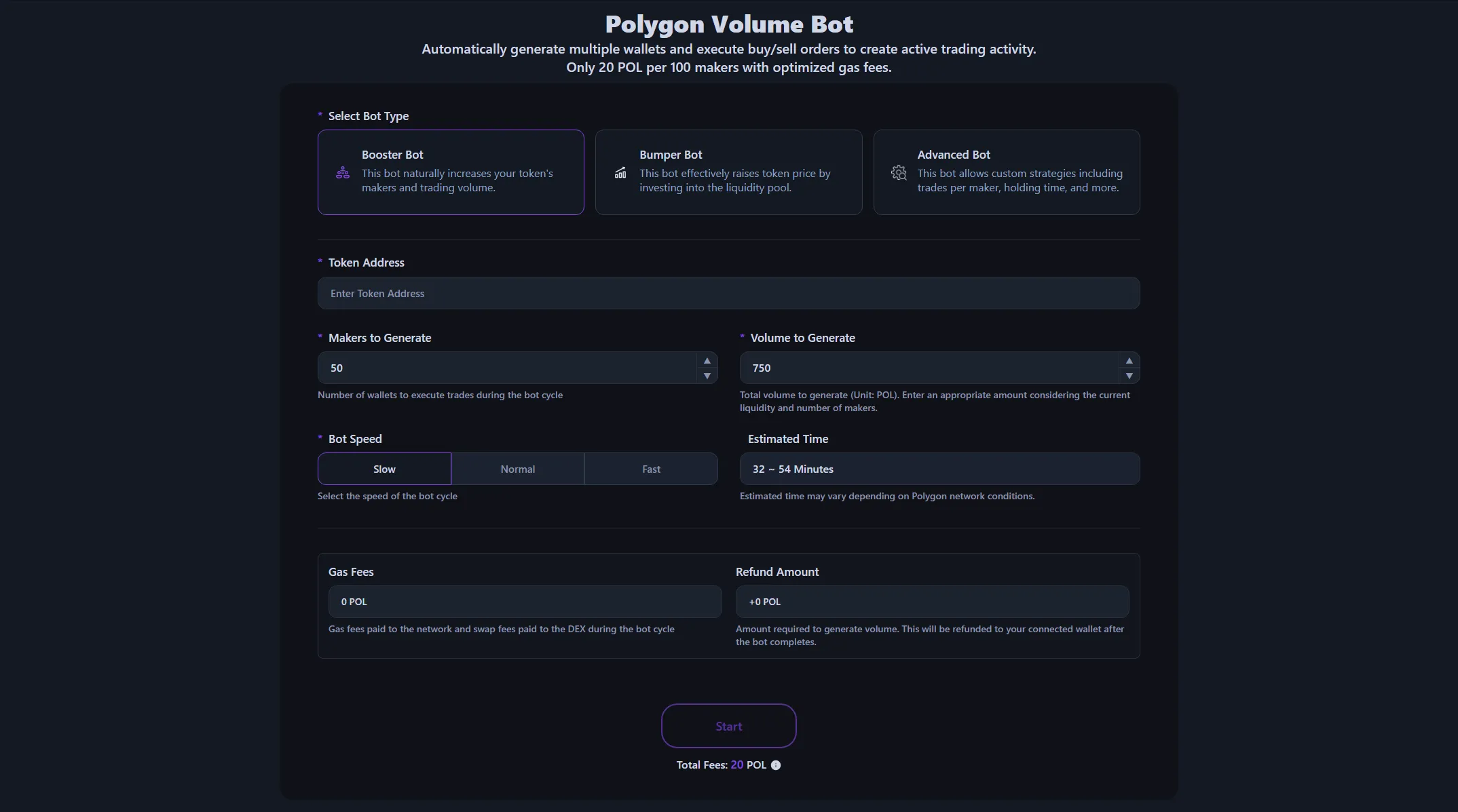
- Select Bot Type: Choose the bot type that fits your purpose.
- Booster Bot: Generates natural trading volume through optimized gas and swap fees.
- Bumper Bot: Increases token price by directly injecting POL into the liquidity pool.
- Advanced Bot: For experienced users who want to configure detailed parameters like buy/sell count per maker and holding time.
- Enter Token Address: Input the address of the token or meme coin you want to boost.
- Configure Settings: Set the number of makers to generate, trading volume or POL amount to inject into the liquidity pool, and bot speed.
- Check Bot Preview: Review the gas fees for the bot cycle, DEX fees, and the POL amount to be refunded after completion.
- Click Start Button: Once payment is confirmed in your wallet app, the bot will start working.
- Check Bot Logs: View all transaction logs performed by the bot in the Transaction Logs tab at the bottom.
For detailed tutorials on Polygon Volume Bot, visit the Polygon Volume Bot Guide Page.
Once the bot starts, the token boosting effect appears instantly on all DEXs and screeners. When the bot cycle ends, all remaining POL is autoPOLally refunded to the wallet that made the payment.
What is a Polygon Token Volume Bot?
It's an automation tool to increase trading volume and maker count on the Polygon network. It creates multiple wallets and autoPOLally executes buy/sell orders to make your token appear actively traded on DEXs. This helps secure top visibility on platforms like DexScreener and DEXTools, driving organic investor interest.
Alphecca's volume bot accurately calculates required gas fees and features an intuitive interface that anyone can use without programming knowledge.
Benefits of Alphecca's Polygon Volume Bot
Here's what sets Alphecca apart from Telegram bots and other volume bot providers:
- Accurate Cost Calculation: Calculates gas usage and real-time gas costs for all transactions with high accuracy. AutoPOLally reflects swap fee rates for each DEX including QuickSwap, Uniswap, and SushiSwap, so you can see actual costs before starting.
- Gas Fee Optimization: Polygon offers extremely low gas fees as an Ethereum sidechain, but gas usage varies by DEX. Alphecca optimizes individually to reduce unnecessary gas spending.
- Transparent Transaction Logs: All transactions performed by the bot are disclosed in real-time. You can verify each maker's buy/sell timing and gas fees, and validate everything on PolygonScan.
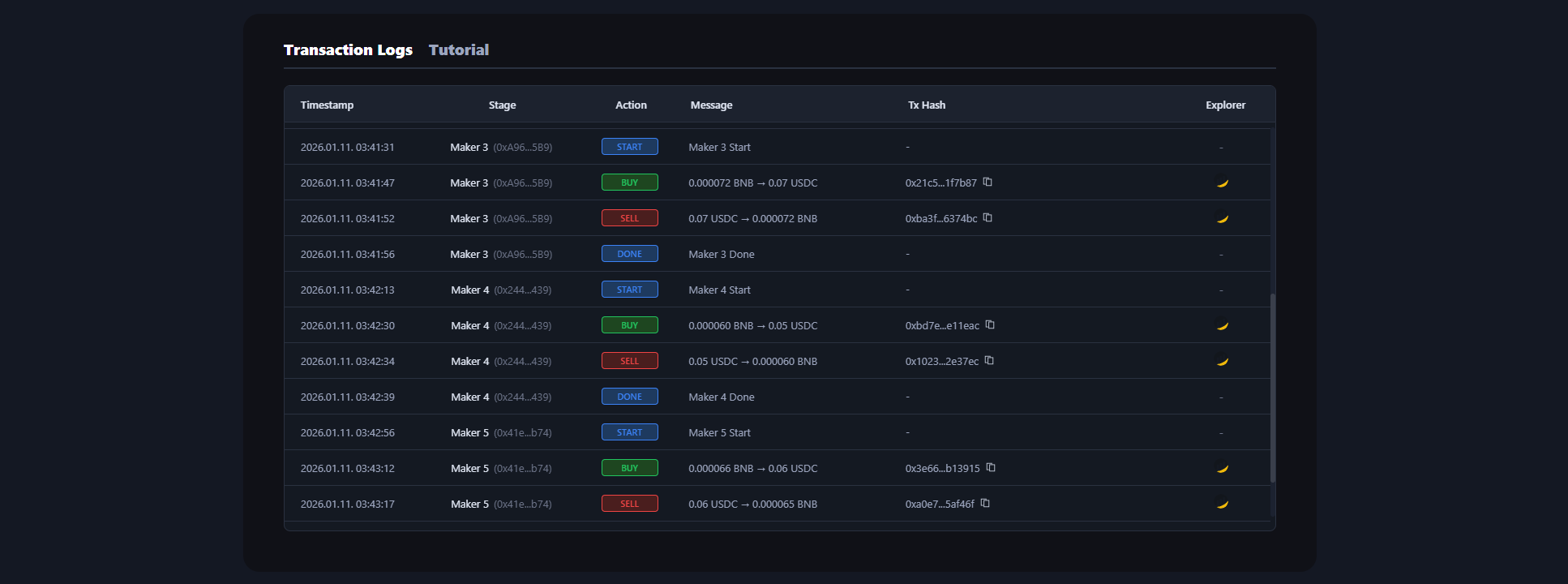 Polygon Volume Bot log screen where you can check all transaction records
Polygon Volume Bot Cost
Available at 20 POL per 100 makers, with no additional cost based on trading volume. Gas fees and DEX swap fees are calculated and displayed before starting the bot, executed at optimized amounts. You can also see the POL to be refunded after the bot completes.
Polygon Volume Bot: Start on the Proven L2
Polygon is the oldest and most proven Ethereum L2 chain. With a long history of operation since 2017, it's trusted by both institutional and individual investors for its stability. By entering Polygon trending with a volume bot, you can gain exposure to investors in this proven ecosystem.
Polygon is the blockchain chosen by global brands. Major companies like Starbucks, Nike, Reddit, and Disney have built Web3 projects on Polygon. These enterprise partnerships enhance the chain's credibility and attract mainstream investor attention.
QuickSwap and Uniswap are established as Polygon's main DEXs. Tokens that trend on Polygon on DexScreener are exposed to stable liquidity pools. You can efficiently operate a volume bot with low gas fees while maintaining Ethereum's security.
Alphecca Volume Bot Security for Polygon
Alphecca transparently discloses all transactions. You can verify each maker's buy/sell timing, gas fees used, and amounts to be recovered, all verifiable on PolygonScan. We do not hold user assets or store wallet information. For inquiries, our support team is available 24/7.
Frequently Asked Questions
Here are frequently asked questions about using the Polygon Volume Bot. If you have questions about how it works, costs, or security, check below.
How does the Polygon Chain Volume Bot work?
The Polygon Volume Bot autoPOLally calculates DEX swap fees, network gas usage and fees, and volume generation costs when you input parameters. Once payment is complete, the amount minus service fees moves to a newly created main wallet. The main wallet creates the set number of maker wallets and distributes funds to each. Each maker wallet completes token buy and sell operations, then returns funds to the main wallet. This cycle repeats until all makers complete their tasks, and the final remaining amount is autoPOLally refunded to the connected wallet.
Interested in meme coins? Check out the Polygon Meme Coin Creation Guide.
How does the Polygon Volume Bot lead to profit?
Trending rankings on screeners like DexScreener are determined by a combination of trading volume, unique maker wallet count, and trading consistency. Tokens with active trading from various wallet addresses are more likely to appear in trending sections and attract organic investor interest. Understanding this algorithm is key to maximizing token visibility.
Does the bot keep running if I leave the page?
Yes. Once bot execution starts, it continues running even if you leave the page or close the browser entirely. When the bot completes, remaining POL and tokens are autoPOLally returned to the wallet that made the payment.
Is using the Polygon Blockchain Volume Bot legal?
Legality depends on your local regulations and platform terms. Users must comply with applicable laws in their jurisdiction. Alphecca provides tools for legitimate trading activity enhancement, but users are responsible for how they use the tools.
Wrapping Up the Polygon Volume Bot Guide
After token launch, project success depends on visibility. No matter how great the idea or technology, growth is difficult if investors don't notice it. A volume bot is an effective tool for securing this initial visibility. Polygon, as an Ethereum sidechain, offers extremely low gas fees, fast transaction processing, and a mature DeFi ecosystem, providing an optimized environment for volume bot operation. With the Polygon Volume Bot, professional trading volume management is possible without complex setup.