Solana Volume Bot Guide (2026): Every DEX, Every Token
Once you've deployed a token on Solana, the next challenge is visibility. Without trading activity, your token gets buried among thousands of others flooding Raydium, Orca, Meteora, and Jupiter. On DEXTools and DEXScreener, tokens with consistent volume and growing maker counts rise to the top — and that's where real investors are looking.
This guide explains how volume bots work across every Solana DEX, what sets them apart from other platforms, and how to run one from start to finish.
What Is a Solana Volume Bot?
A volume bot is an automated market-making tool that generates distributed trading activity through multiple independent wallets. Repeating trades from a single address creates a detectable pattern, but a bot creates dozens to hundreds of maker wallets, each executing buys and sells independently.
The result is increased maker counts, higher 24-hour volume, and naturally-looking chart activity on aggregator platforms.
Solana volume bots work on any supported Solana DEX liquidity pool, including Pump.Fun, LaunchLab, Raydium CLMM, Raydium CPMM, Orca Whirlpool, and Meteora DLMM. Any token, any pair.
Learn more about how to avoid Solana volume bot scams in our comprehensive guide.
How DEX Trending & Rankings Work
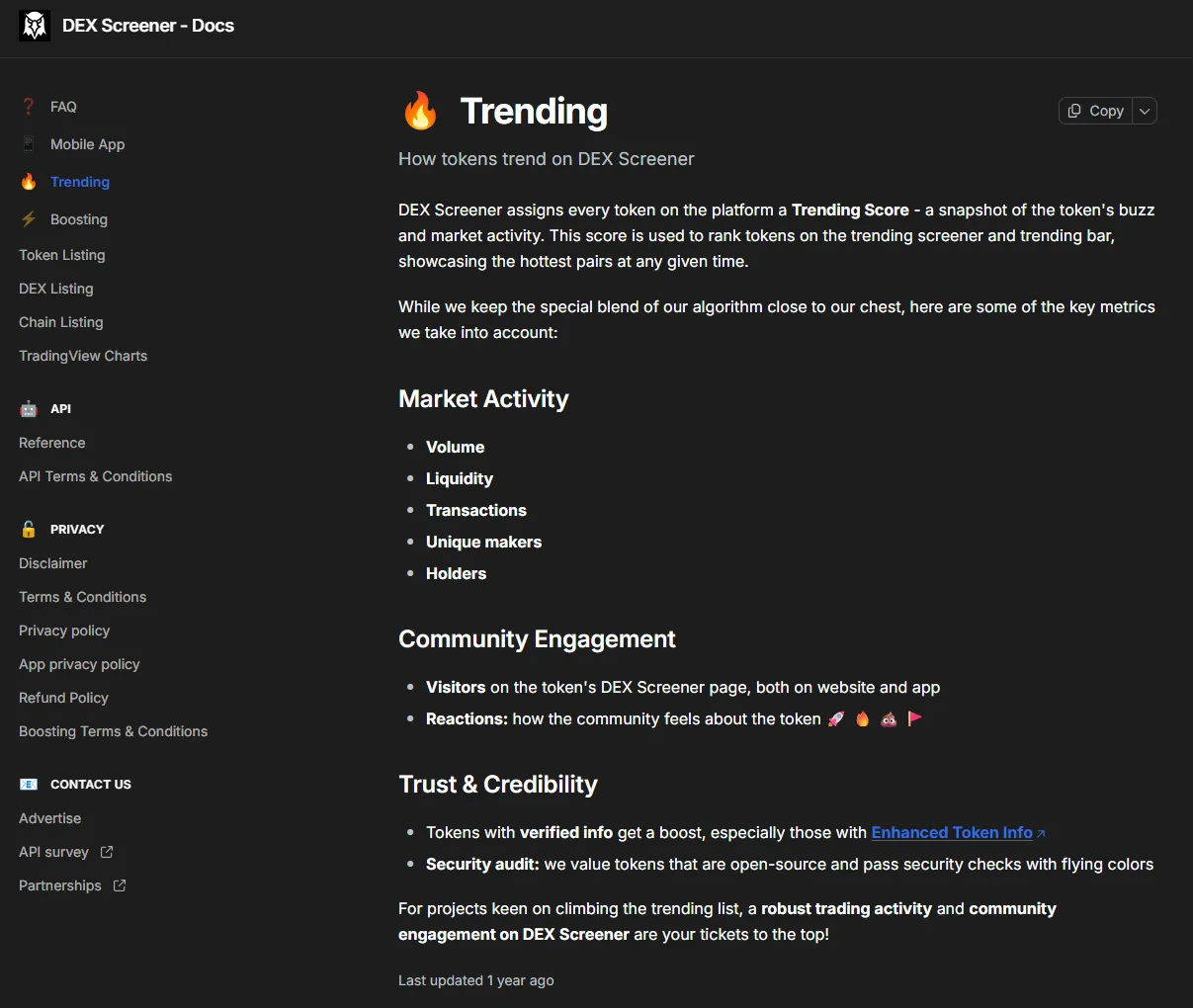 Token rankings on DEXScreener and DEXTools are determined by volume, maker count, and trading consistency.
Token visibility on aggregator platforms like DEXScreener and DEXTools is determined by three core signals:
- 24-hour trading volume — Total SOL/USDC value of executed trades
- Unique maker count — Number of unique wallet addresses that traded the token
- Trading consistency — Sustained activity over time, not one-time spikes
Tokens that show healthy numbers across all three metrics rise to trending and hot lists. Bots that rely on a single wallet or repeat identical patterns get filtered out. Distributed trades from independent wallets with time intervals are what actually work.
Why Alphecca — A Real Cost Breakdown
Most teams compare volume bots by service fees alone. But there's another factor to consider: the network costs of running the bot. Costs incurred in a bot cycle include per-transaction gas fees, DEX account rent (ATA), and in some cases exchange-specific PDAs (0.0018444 SOL for Pump Fun).
Many platforms don't disclose these costs. Because they haven't optimized them. Gas fee optimization isn't just about lowering a number. It requires precisely tuning Compute Unit allocation, priority fee settings, and instruction packing on a per-transaction basis — get it wrong and transactions either drop or cost more. That's why most platforms set gas "generously." It's easier.
Here's what makes Alphecca different.
Lowest Gas Fees, Verifiable On-Chain
The minimum transaction gas fee on Solana is 0.000005 SOL. Every transaction on the Solana network — transfers, buys, sells — incurs at least 0.000005 SOL. Alphecca runs bots at this minimum gas cost. No margins, no "safety" rounding.
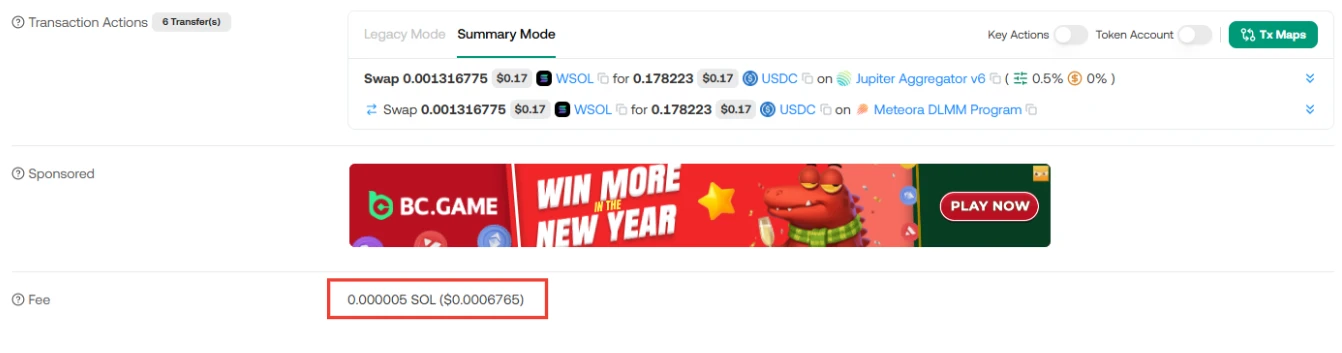 Every swap transaction uses the minimum 0.000005 SOL network fee — verifiable directly on Solscan.
Volume bots generate hundreds to thousands of transactions per cycle. At 0.000005 SOL, 1,000 trades cost 0.005 SOL in gas. On platforms charging 0.001 SOL per transaction, those same 1,000 trades cost 1 SOL in gas alone. That's a 200x difference in costs most users never check.
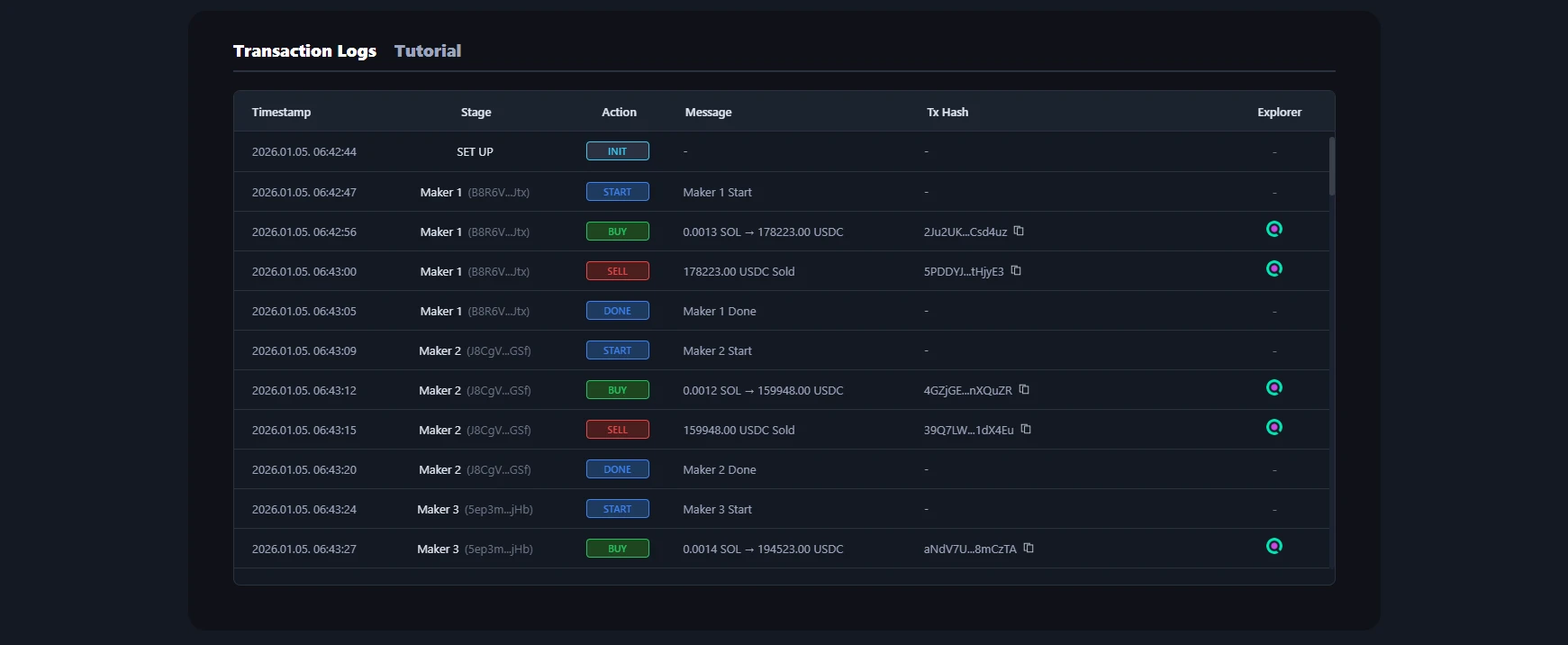
All gas data is available in Alphecca's transaction logs. Click any hash to verify directly on-chain.
Automatic Account Rent Recovery
When a wallet interacts with a new token on Solana for the first time, an Associated Token Account (ATA) is created. This costs approximately 0.00203928 SOL in rent. When a volume bot creates over 100 maker wallets, this adds up fast.
For Pump.Fun tokens, an additional 0.0018444 SOL PDA is created per bot wallet on top of the ATA.
Alphecca closes both ATAs and PDAs after each maker completes its cycle, recovering rent in full and consolidating funds to the main wallet. Once the entire bot cycle ends, all balances including recovered rent are automatically returned to your connected wallet.
If you're using a volume bot from another platform, we recommend checking on Solscan whether maker wallet ATAs and PDAs were actually closed. Many bots particularly don't recover Pump.Fun PDA rent — at 0.0018444 SOL per maker, that's 1.84 SOL lost on 1,000 makers.
 Pump Fun PDA rent of 0.0018444 SOL recovered and confirmed.
Real-Time Transaction Logs
Every bot action is logged and linked for verification. In the transaction log tab, you can see:
- Maker wallet creation
- Individual buy/sell transactions per maker wallet
- ATA creation and closure events
- Final fund consolidation to main wallet
Monitor every action the volume bot performs in real time.
Click any transaction hash to verify the data directly on Solscan. If a platform doesn't offer this kind of transparency, you can't know where your money is going.
5 Questions to Ask Before Using Another Platform
Before sending SOL to any volume bot service, make sure you get clear answers:
- What is the exact gas fee per transaction?
- Are ATA and PDA rent recovered and returned after each cycle?
- Are all remaining funds automatically refunded when the cycle ends?
- Can you see full transaction logs in real time?
- Can every transaction be verified on-chain by hash?
Alphecca answers "yes" to all five. If a platform avoids giving a clear answer to any of these, that's where your money goes.
Supported DEXs & Pools
Alphecca's volume bot works on all active liquidity pools across major Solana DEXs:
- Pump.Fun — Pump.Fun and Pump.AMM pools
- Raydium — CLMM, CPMM, and AMM pools
- Orca — Whirlpool concentrated liquidity pools
- Meteora — DLMM dynamic pools
- All token pairs supported — SOL, USDC, USDT, and other base tokens
Enter your token's mint address to check bot compatibility directly.
Step-by-Step Guide
Navigate to the Volume Bot page.
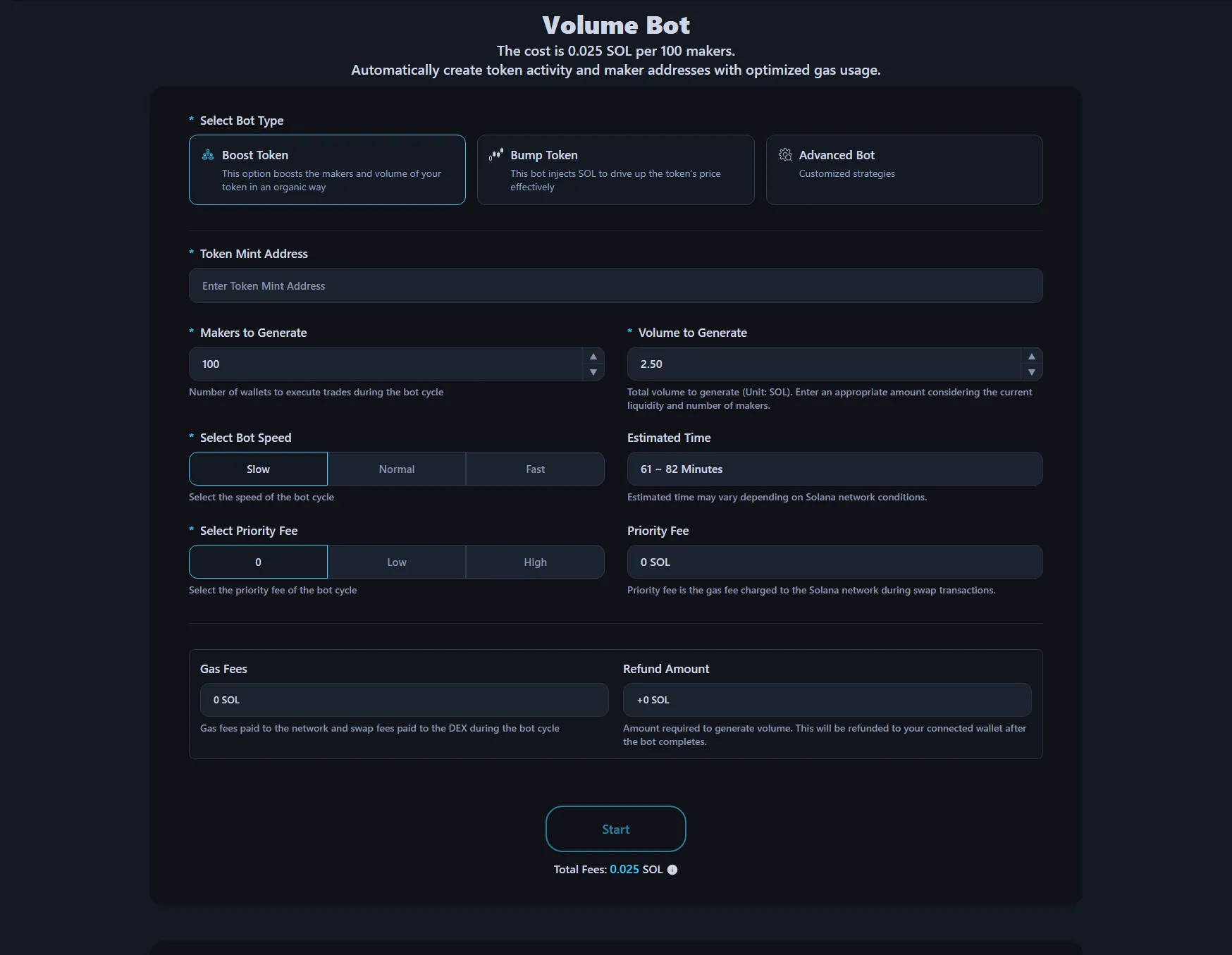
1. Connect Wallet Click the connect wallet button in the top right. Use the wallet that will fund the bot cycle.
2. Select Bot Mode
- Booster Bot — Distributes buy/sell cycles across multiple makers to naturally increase volume and maker count
- Bumper Bot — Injects directional liquidity to push token price upward
3. Enter Token Mint Address Paste your token's mint address. All available pools across supported DEXs will be displayed. Select your target pool.
4. Set Parameters Set the number of makers and total volume to generate. More makers create a more naturally distributed pattern. Preview the estimated total cost before execution in the bot preview.
5. Start and Approve Click start and approve the transaction in your wallet. The bot begins executing immediately on Alphecca's servers.
6. Monitor in Real Time Switch to the transaction log tab to watch every step in real time. The bot runs server-side, so it continues even if you close your browser.
7. Automatic Refund on Completion When all maker cycles are complete, remaining SOL, tokens, and recovered ATA rent are automatically sent to your connected wallet. No separate withdrawal needed.
For detailed instructions, visit the Solana Volume Bot Tutorial page.
YouTube video tutorial. You can enable subtitles → "English" in settings.
Pricing
0.025 SOL per 100 makers — a flat fee regardless of the volume generated.
All additional costs including gas fees, DEX swap fees, and SOL needed for volume generation are automatically calculated and displayed before payment. What you see is what you pay. Everything except the service fee is returned after the cycle ends.
Maximizing Volume Bot Impact
The bot creates trading signals that get your token noticed. But it doesn't replace the reason people should care about the project. Teams that see lasting results from volume campaigns pair bot activity with:
- Active social channels (Twitter/X, Telegram)
- Consistent content creation and community engagement
- Token utility or narrative worth spreading
Volume without a story gets a momentary glance. Volume with a strong narrative converts that attention into holders.
FAQ
What DEXs does Alphecca support?
Pump.Fun, Raydium (CLMM, CPMM, AMM), Orca (Whirlpool), and Meteora (DLMM). If there's an active pool on any of these DEXs, the bot can target it.
Does it work with any token pair?
Yes. SOL pairs, USDC pairs, USDT pairs — it works with any token that has a supported liquidity pool.
What happens to my SOL when the bot finishes?
All remaining SOL and recovered ATA rent are automatically returned to the wallet used to start the bot, minus the service fee.
Can I track progress while the bot is running?
Yes, in real time. The transaction log tab shows wallet creation, buys, sells, ATA closures, and fund consolidation. Each entry links to a verifiable hash on Solscan.
What happens if I close my browser after starting?
The bot runs on Alphecca's servers. Closing your browser has no effect on execution. When the cycle completes, funds are automatically returned to your wallet.
Is using a Solana volume bot legal?
Legality depends on your local regulations and platform terms. Users must comply with applicable laws in their jurisdiction. Alphecca provides tools for legitimate trading activity enhancement, but responsibility for how the tools are used lies with the user.
How many makers should I run?
It depends on your goals. More makers create more distributed, natural-looking activity and higher maker counts on DEXScreener/DEXTools. Preview expected costs in the bot interface before execution.
Get Started
Ready to boost your token's visibility across Solana DEXs? Try the Alphecca Volume Bot — transparent costs, automatic refunds, and full on-chain verification.