
How to Remove Liquidity on Solana (Raydium) — Get Your Assets Back in Seconds
You added liquidity to a Raydium pool. Now you want it back — your SOL, your tokens, everything. The problem is that Raydium's own interface can be slow to display your positions, and if you created the pool through a third-party tool, finding the right pool ID to withdraw can be frustrating.
The Solana Liquidity Remover on Alphecca skips all of that. Connect your wallet, and it automatically detects your LP token positions. Select the one you want to withdraw from, choose how much to remove, and confirm. Both sides of the pair — your tokens and your SOL — are returned directly to your wallet.
What Does Removing Liquidity Actually Mean?
When you add liquidity to a pool on Raydium (one of the largest Solana DEXs), you deposit two assets — typically your token and SOL — and receive LP (Liquidity Provider) tokens in return. These LP tokens represent your share of the pool.
Removing liquidity is the reverse: you redeem your LP tokens, and the protocol calculates your proportional share of the pool's current reserves. You get back both assets based on the pool's current state.
The amounts you receive may differ from what you originally deposited. This is normal. It's the result of trades that occurred in the pool while your liquidity was active — a concept known as impermanent loss. If the token's price moved significantly in either direction since you added liquidity, the ratio of the two assets in your withdrawal will reflect that shift.
YouTube video tutorial. You can enable subtitles → "English" in settings.
Why Not Just Use Raydium Directly?
You can. But there are common pain points that lead people to use dedicated tools instead:
Pool display delays. Raydium's interface can take time to show newly created pools. If you just launched a pool and want to pull liquidity quickly, waiting isn't ideal.
Pool ID lookup. Most alternative methods require you to find and paste the AMM ID (pool address) manually. If you didn't save it during pool creation, you'll need to dig through Solscan transaction history to locate it.
Speed. When you need to act fast — say, to respond to market conditions or recover funds — a streamlined interface matters.
Alphecca's Liquidity Remover eliminates the pool ID step entirely. It reads your wallet's LP token balances directly, so your positions show up the moment you connect.
How to Remove Liquidity on Alphecca
Navigate to Remove Liquidity and connect the wallet that holds your LP tokens.
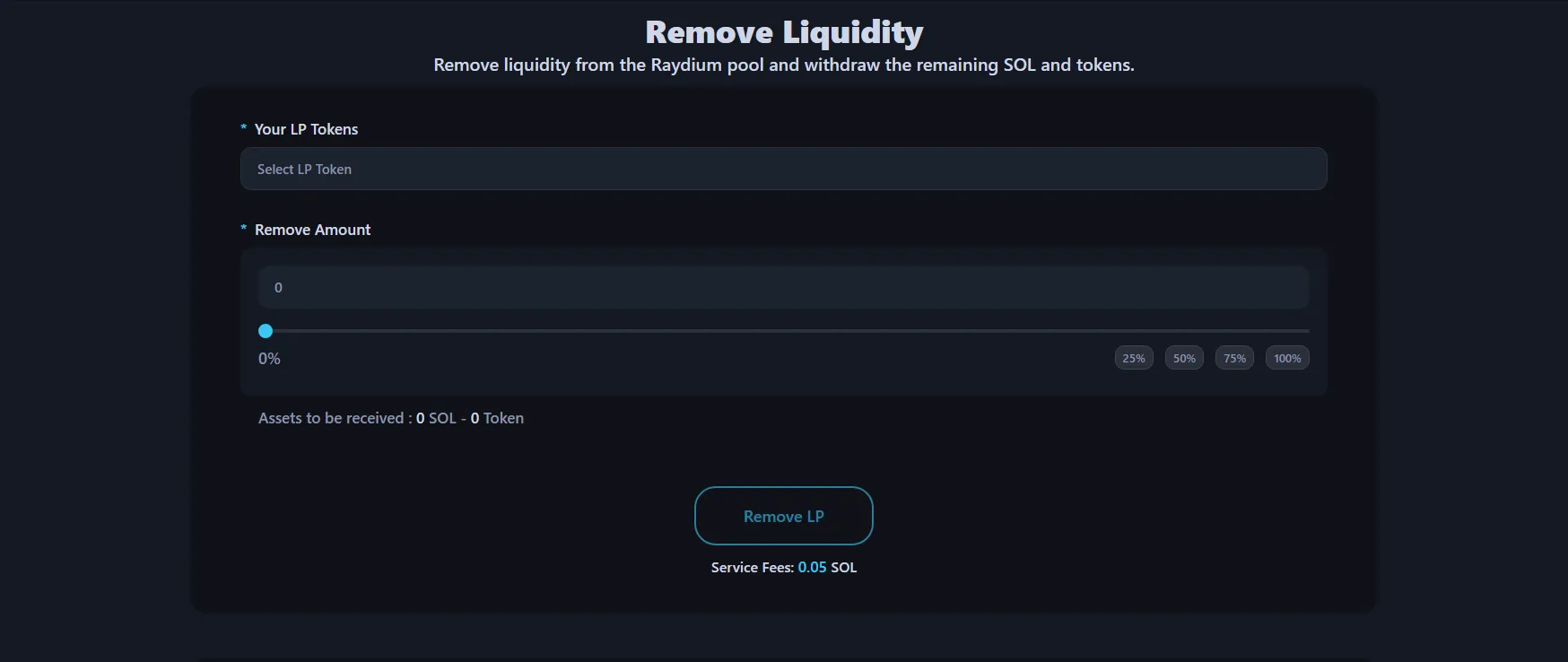
Step 1: Connect Your Wallet
Click the Connect Wallet button in the top-right corner. The tool supports wallet extensions like Phantom. Once connected, it automatically scans your wallet for LP token positions.
Step 2: Select Your LP Token
Your active liquidity positions appear automatically. Select the pool you want to withdraw from. You'll see the token pair and your current LP token balance.
Step 3: Choose the Amount to Remove
Use the slider to set how much liquidity you want to remove — anywhere from a small portion to 100% of your position. The interface shows an estimate of the tokens and SOL you'll receive based on the current pool reserves.
Step 4: Confirm and Withdraw
Click Remove Liquidity and approve the transaction in your wallet. Within seconds, both assets from the pool are returned to your wallet. You can verify the transaction on-chain through the provided transaction link.
Cost: 0.05 SOL flat service fee per removal, plus standard Solana network gas.
What Happens to My Assets After Removal?
Both tokens in the pair are sent directly back to your connected wallet. If you had a SOL/TOKEN pool, you'll receive SOL and TOKEN based on the pool's current ratio.
Your LP tokens are burned in the process — they no longer exist after redemption. If you removed 100% of your position, the pool will show zero balance for your wallet.
Any trading fees that accumulated in the pool while your liquidity was active are included in the withdrawal. You don't need to claim them separately — they're baked into the LP token value.
When Should You Remove Liquidity?
There's no universal answer, but here are common scenarios:
Project migration. You're moving to a new pool with different parameters, a new token pair, or a different DEX entirely.
Taking profits. The pool has generated trading fees and you want to realize the gains by withdrawing.
Repositioning. Market conditions have changed and you want to adjust your exposure — perhaps adding liquidity at a different price range or with different amounts.
Token lifecycle management. You launched a token, the pool served its purpose, and now you need to recover the paired assets.
Emergency response. Something unexpected happened — a vulnerability, a market crash, or a need for immediate capital — and you need your funds back now, not later.
FAQ
Do I need the pool ID to remove liquidity?
No. Alphecca's tool detects your LP token positions automatically when you connect your wallet. No pool ID or AMM ID lookup required.
Can I remove only part of my liquidity?
Yes. Use the slider to choose any percentage from 1% to 100%. You don't have to withdraw everything at once.
What tokens will I receive?
Both sides of the trading pair. If your pool was SOL/TOKEN, you'll receive both SOL and TOKEN in the proportion that reflects the pool's current reserves.
How long does it take?
A few seconds. The transaction confirms on Solana almost instantly once you approve it in your wallet.
What if my pool doesn't show up?
Make sure you're connecting the same wallet that holds the LP tokens. If you transferred LP tokens to a different wallet, connect that wallet instead.
Is my liquidity locked?
If your LP tokens were burned (sent to a burn address), that liquidity is permanently locked and cannot be removed by anyone. This tool only works with LP tokens that are still in your wallet.
How much does it cost?
0.05 SOL per removal transaction, plus minimal Solana network gas fees.