
Uniswap Volume Bot Complete Guide: Essential Tool for Token Projects (2026)
Launched a token but struggling with low trading volume? Is your 24-hour transaction count showing single digits on DexScreener, with barely any trades happening and your DEX ranking slipping? Uniswap is the leading decentralized exchange (DEX) supporting most EVM chains including Ethereum, Arbitrum, Base, and Polygon. Today, we'll walk through how to effectively boost your trading volume using Alphecca's volume bot and break into DexScreener trending.
What is a Volume Bot?
A Uniswap volume bot is a tool that automatically generates trading volume and maker count for your token on Uniswap DEX. It creates natural buy/sell patterns using multiple maker wallets, increasing your token's visibility on DexScreener and DEXTools. Since Uniswap is deployed across multiple chains including Ethereum, Arbitrum, Base, and Polygon, you can choose your preferred chain to run the volume bot.
Key use cases:
- Boost visibility and DEX rankings on DexScreener, DEXTools
- Display trading activity to attract new investors
- Bootstrap early token ecosystem
- Maximize exposure through DexScreener trending
YouTube video tutorial. You can enable subtitles → "English" in settings.
This video shows the Binance Smart Chain (Four.Meme) volume bot tutorial, but the same interface applies to the Uniswap volume bot.
Bot Types
Alphecca's Uniswap volume bot offers three types based on your goals. From simple volume generation to price pump strategies, choose the bot that fits your project's needs.
Booster Bot
The most basic volume generation bot. Focuses on naturally increasing your token's maker count and trading volume. Use this when you simply want to boost trading activity on Uniswap and raise your DexScreener 24h Volume metrics. It automatically calculates the minimum cost needed to reach your target volume, optimizing gas fees and swap fees. Available on any Uniswap-supported chain including Ethereum, Arbitrum, and Base.
Bumper Bot
A volume bot that injects funds directly into the liquidity pool to push token prices up. Works similarly to the Booster Bot, but instead of selling all purchased tokens, it only sells a portion to create gradual price increases. Ideal for simultaneously generating volume and price momentum to increase your chances of entering DexScreener trending. Remaining tokens are automatically returned to your payment wallet after completion.
Advanced Bot
A professional-grade volume bot for experts. Configure detailed parameters like trades per maker, token holding time, and trade intervals. Perfect for projects that want precise control over trading patterns in Uniswap pools.
Step-by-Step Guide
Here's how to use the Uniswap volume bot on Alphecca.
Step 1: Access the Volume Bot Page
Alphecca offers volume bots for 8 major EVM chains including Ethereum, Binance Smart Chain, Base, and Polygon. Navigate to the chain page for the token you want to boost. The screenshot below shows the Ethereum volume bot interface, the most popular EVM chain.
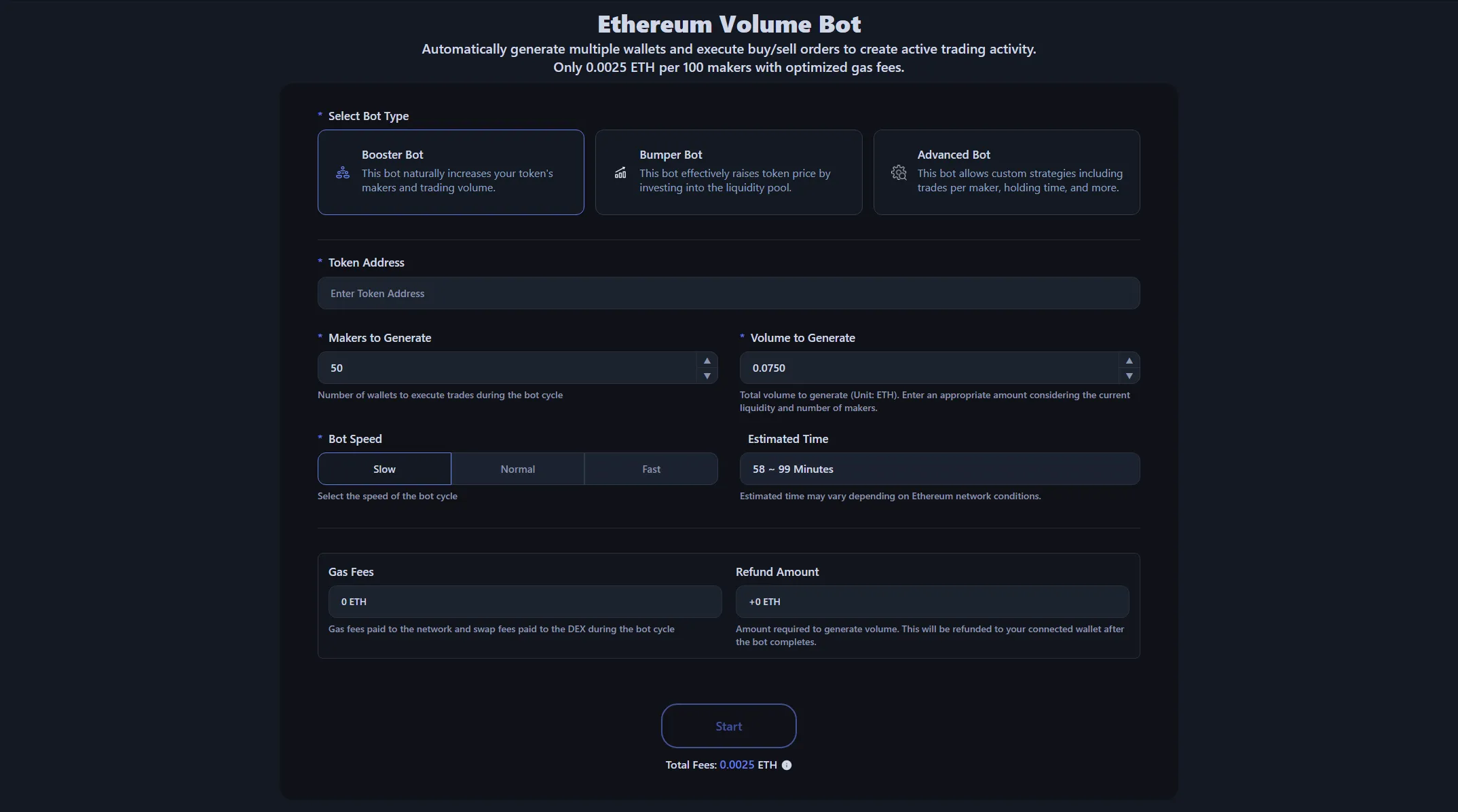 The image shows the Ethereum volume bot, but all chains share the same interface.
| Chain | Features | Link |
|---|---|---|
| Ethereum | Largest liquidity, preferred by institutional investors | Ethereum Volume Bot |
| Binance Smart Chain | Strong Asian market presence, active memecoin ecosystem | BSC Volume Bot |
| Base | Coinbase ecosystem, concentrated US investor base | Base Volume Bot |
| Polygon | Proven L2, global brand partnerships | Polygon Volume Bot |
| Avalanche | Subnet architecture, gaming/NFT focused | Avalanche Volume Bot |
| Monad | Ultra-fast 10,000 TPS, parallel EVM processing | Monad Volume Bot |
| Arbitrum | Low gas fees, inherits Ethereum security | Arbitrum Volume Bot |
| Optimism | Built on OP Stack, fast transactions | Optimism Volume Bot |
Step 2: Connect Wallet
Connect your Web3 wallet like MetaMask to Alphecca. Make sure you have enough funds for gas fees and bot operation. Set your wallet to the desired network among Uniswap-supported chains (Ethereum, Arbitrum, Base, Polygon, etc.).
Step 3: Enter Token Address
Enter the contract address of the token you want to generate volume for. Once Uniswap liquidity pools for your token are displayed, select your target pool. Double-check that it matches the pool address shown on DexScreener.
Step 4: Set Maker Count
Set the number of maker wallets the volume bot will use. More makers create more natural trading patterns and improve DEX rankings, but also increase initial costs.
Recommended guideline: Keep (target volume ÷ maker count) below 3% of the current Uniswap pool liquidity. Exceeding this ratio may make you a target for MEV bot sandwich attacks.
Step 5: Set Amount
| Bot Type | Setting | Description |
|---|---|---|
| Booster Bot | Target Volume | Enter total trading volume to display on DexScreener |
| Bumper Bot | Liquidity to Inject | Amount to add to the Uniswap pool |
Step 6: Select Speed
| Speed | Resources | Features |
|---|---|---|
| Slow | 1 core | Lower cost, slower execution, ideal for long-term operation |
| Normal | 2 cores | Balanced speed, standard DEX ranking boost |
| Fast | 3 cores | Maximum speed, parallel processing, short-term DexScreener trending push |
Actual speed may vary based on network conditions and chain block times. L2 chains like Arbitrum and Base offer faster execution than Ethereum mainnet.
Step 7: Review Costs
The volume bot preview transparently displays all costs required for the bot cycle. Check service fees, gas and Uniswap swap fees, and minimum capital needed:
- Gas Fees: Network fees + total swap fees payable to Uniswap pool
- Recoverable Amount: Funds used for volume generation (refunded to wallet after cycle completion)
- Expected Volume: Total trading volume the bot will generate (reflected in DexScreener 24h Volume)
- Recovered Tokens: Tokens returned when using Bumper Bot
Step 8: Start
Click the Start button and approve the transaction in your wallet to launch the Uniswap volume bot. Monitor real-time status in the Transaction Logs tab.
Alphecca Uniswap Volume Bot Advantages
Accurate Cost Calculation
Alphecca automatically calculates gas fees and Uniswap swap fees per cycle for each network. When you enter a token address, it automatically retrieves the pool's fee rate, current gas price, and expected slippage to calculate actual costs. Review total costs and recoverable amounts before execution to stay within budget.
Transparent On-Chain Logs
View all bot operations in real-time through the Transaction Logs tab. Each maker wallet's buy/sell amounts, timing, and gas usage are recorded and can be verified on-chain via block explorers like Etherscan.
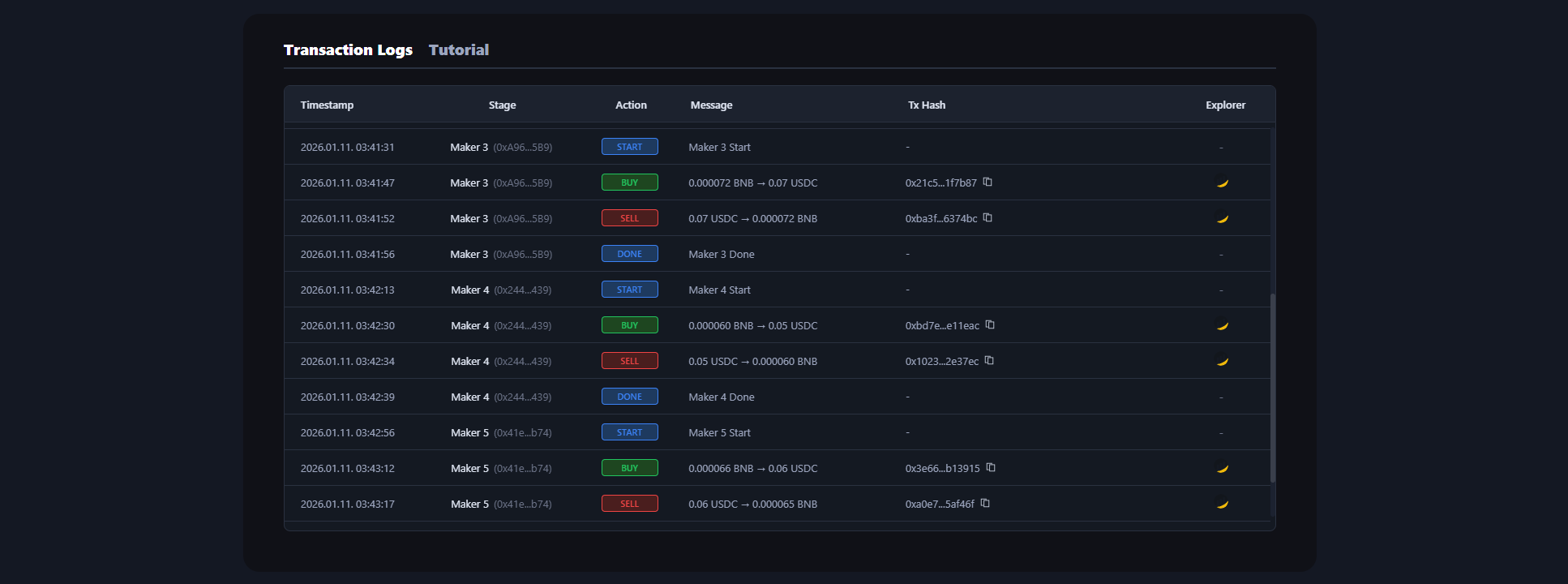 Alphecca's volume bot provides real-time logs for all bot activity.
Pricing
Alphecca volume bot service fees are based solely on maker wallet count, regardless of trading volume generated. Service fees by chain:
| Chain | Bot Cost |
|---|---|
| Ethereum | 0.0025 ETH per 100 makers |
| Binance Smart Chain | 0.015 BNB per 100 makers |
| Base | 0.0025 ETH per 100 makers |
| Polygon | 20 POL per 100 makers |
| Avalanche | 0.7 AVAX per 100 makers |
| Monad | 400 MON per 100 makers |
| Arbitrum | 0.0025 ETH per 100 makers |
| Optimism | 0.0025 ETH per 100 makers |
Important Considerations
MEV Risk Management
MEV risk management is critical. Generating large volume with few makers can make you a target for MEV bot sandwich attacks on Uniswap. If your volume target is high, increase maker count to reduce individual trade sizes. Ethereum mainnet has particularly active MEV activity, so consider using L2 chains like Arbitrum or Base.
Legal Risks
Legal risks should also be considered. Volume generation may be considered market manipulation in some jurisdictions. Be sure to check local regulations and use the Uniswap volume bot within the scope of legitimate marketing purposes for your project.
Conclusion
The Uniswap volume bot is a valuable tool for early-stage token project growth. With Alphecca, you can easily generate trading volume across Uniswap-supported chains including Ethereum, Arbitrum, Base, and Polygon, and aim for DexScreener trending and DEX ranking boosts.
However, sustainable projects ultimately require real utility and community growth. Remember that volume bots are supplementary tools—they cannot replace genuine value creation.