
Solana Multisender: Send Your Tokens to Multiple Wallets at Once
Sending tokens to one wallet at a time is slow, expensive, and impractical the moment you need to reach more than a handful of addresses. The Solana Multisender lets you send SOL or any SPL token to multiple wallets in a single batch — useful for airdrops, team token distributions, community rewards, and presale payouts.
This guide walks through how the Multisender works on Alphecca and what it costs.
What Is Solana Multisender?
Multisender is a bulk token transfer tool that sends SOL or SPL tokens to multiple wallet addresses in batched transactions. Instead of creating and signing individual transfers for each recipient, you provide a list of addresses and amounts, and the tool handles everything in optimized batches.
Each batch is a single Solana transaction containing multiple transfer instructions. Solana's architecture allows packing several instructions into one transaction, which is what makes batch sending both faster and cheaper than individual transfers.
How Much Does It Cost?
0.006 SOL per transaction batch — that's the service fee. Plus standard Solana network gas (fractions of a cent per transaction).
There are no per-address fees. Whether your batch contains 1 address or the maximum, the service fee per batch is the same 0.006 SOL.
Maximum addresses per batch:
| Transfer Type | Max Addresses Per Batch |
|---|---|
| SOL Transfer | 18 |
| SPL Token Transfer | 8 |
If you're sending to more addresses than the batch limit, the tool automatically splits your distribution into multiple transactions. You just provide the full list — the batching is handled for you.
Example: sending SOL to 50 wallets — that's 3 batches (18 + 18 + 14), so the total service fee is just 0.018 SOL. That's 0.00036 SOL per wallet — roughly 3x cheaper than the typical 0.001 SOL per-address fee most platforms charge.
How to Use Multisender on Alphecca
Navigate to Solana Multisender and connect the wallet holding the tokens you want to send.
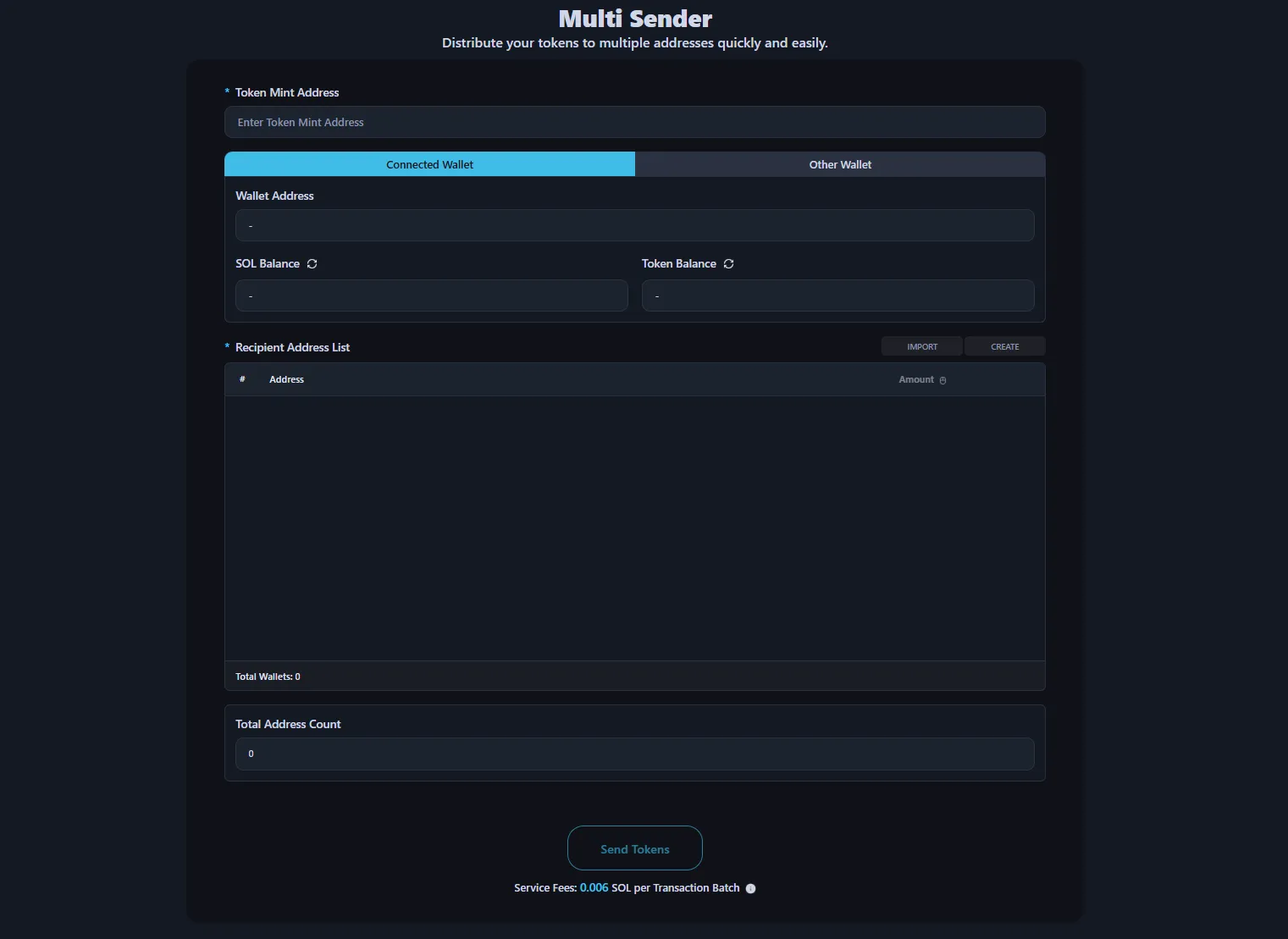
Step 1: Enter Token Mint Address
Enter the mint address of the token you want to send. For SOL transfers, select SOL directly.
Step 2: Connect Wallet
Connect your wallet by clicking the Connect Wallet button in the top-right corner. The tool supports wallet extensions like Phantom.
Step 3: Import Recipient Wallet Addresses
Import the recipient addresses. You can upload a .csv, .txt, or .json file, or paste the address list directly into the input field.
Step 4: Enter Amount
Set how much to send to each recipient:
- Individual Entry — manually enter a specific amount for each recipient
- Fixed Amount — use the Amount button to apply the same amount to all recipients
- Random Amount — apply random amounts within a range you specify
Step 5: Send Tokens
Click Send Tokens. The tool batches your transfers automatically and submits them. Review the transaction logs to verify results on-chain.
Use Cases
Airdrops. Distributing tokens to community members, early supporters, or whitelist holders. Upload a CSV of addresses, set amounts, and send in bulk.
Team token distribution. Sending vested tokens or allocations to team members, advisors, or investors across multiple wallets.
Community rewards. Paying out contest winners, staking rewards, or engagement incentives to multiple recipients simultaneously.
Presale distribution. Delivering purchased tokens to all buyers after a presale event — automatically batched for efficiency.
Why Batch Sending?
Sending tokens individually to 100 wallets means 100 separate transactions — each requiring a signature, each incurring gas, each taking time. With Multisender, those 100 addresses are handled in 6 batches (for SOL) or 13 batches (for SPL tokens), each at 0.006 SOL.
The time savings alone are significant. But the cost savings compound too: fewer transactions means less total gas, and the flat batch fee makes large distributions predictable.
FAQ
What tokens can I send?
SOL and all SPL tokens. Enter the token's mint address and the tool loads the token automatically.
How do I import recipient addresses?
Two methods: upload a .csv, .txt, or .json file containing wallet addresses, or paste addresses directly into the input field. The tool validates addresses before sending.
What happens if I have more addresses than the batch limit?
The tool automatically splits your distribution into multiple transaction batches. You don't need to manage this manually — provide your full list and it handles the batching.
What happens if a transaction fails?
If a transaction batch fails, no service fee is charged for that batch. Successfully completed batches are not affected.
Do I need to be the token creator?
No. You just need a wallet holding the tokens you want to send, with enough SOL to cover service fees and gas.