
How to Use the Solana Maker Bot — Increase Maker Count with Full Control
Maker count is one of the metrics DEX platforms use to determine which tokens get visibility. Every unique wallet that buys your token registers as a maker — it's how platforms like DexScreener and Birdeye measure how many independent addresses have traded your token. A token bought by 500 different wallets tells a very different story than one traded back and forth between 5 wallets.
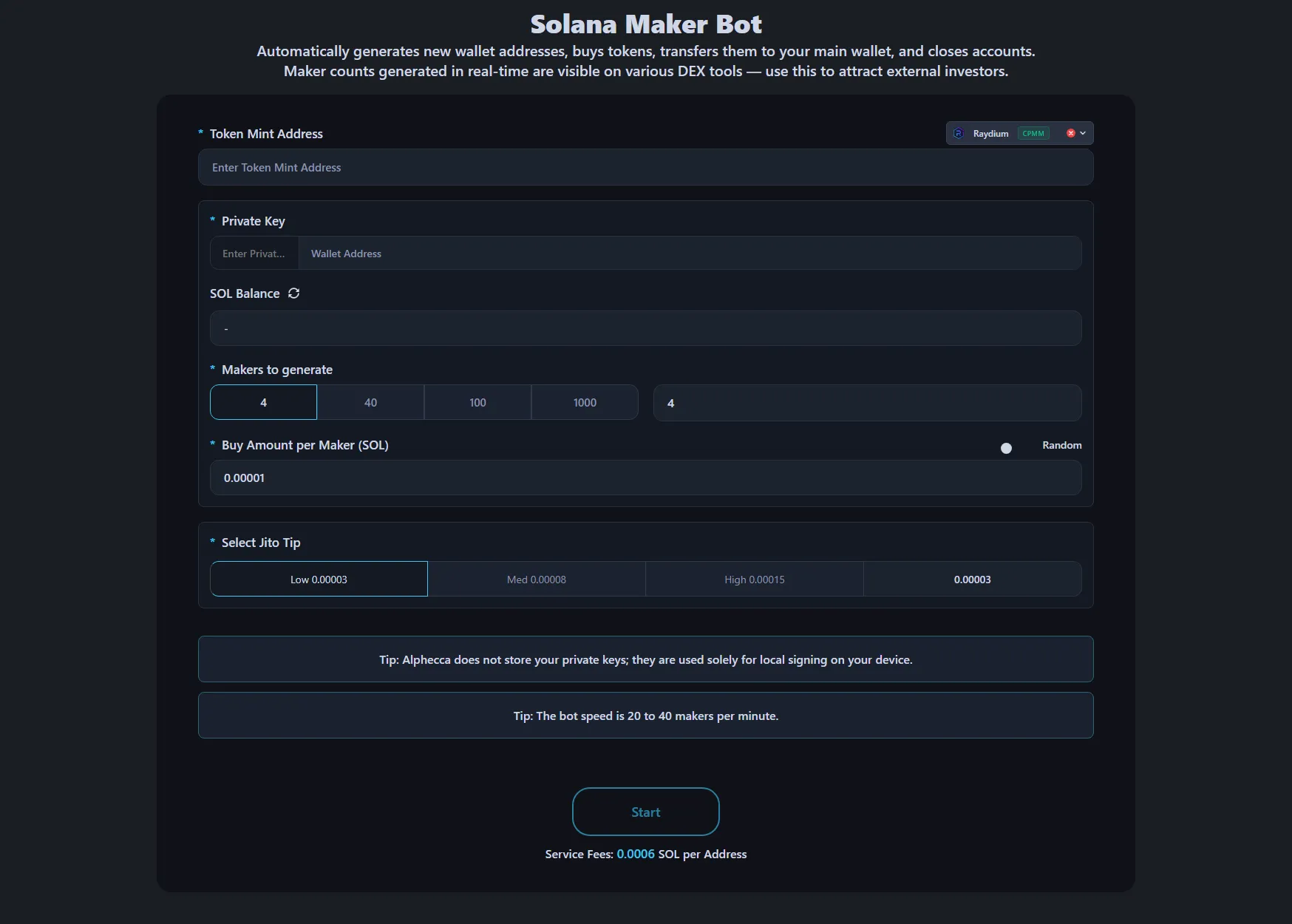
The Solana Maker Bot on Alphecca Tools creates new wallets, buys your token from each one via Jito bundles, sends the tokens back to your payment wallet, and fully cleans up the maker wallet afterward.
Why Maker Count Matters
DEX aggregators and token scanners weigh maker count alongside volume and holder count when ranking tokens. A token with high volume but only a handful of unique buyers looks like wash trading. Balanced metrics across all three dimensions is what gets tokens surfaced.
Trending algorithm input. DexScreener, Birdeye, and GeckoTerminal all factor unique buying wallets into their ranking logic. A sudden spike in volume from the same few wallets doesn't move you up the way the same volume spread across hundreds of unique wallets does.
Trader psychology. When someone opens a token page, they see makers and buyers as separate counts. A high maker count signals broad interest — lots of different people independently deciding to buy. That's the kind of chart activity that makes other traders want to join.
Complements other metrics. Maker count alone doesn't make a token trend. But without it, high volume looks suspicious and high holder count looks stale. Makers are the activity layer — they show that people are buying right now.
How the Maker Bot Works
- The bot creates a brand new wallet
- Transfers the exact SOL needed from your payment wallet
- Buys your token from the new wallet via Jito bundle
- Sends the purchased tokens back to your payment wallet
- Closes the ATA account and reclaims 0.00203928 SOL rent
- For Pump.Fun tokens, closes the PDA account and reclaims an additional 0.0018444 SOL
- Transfers all remaining SOL back, leaving the maker wallet completely empty
- Repeats for the next maker
Every buy comes from a unique address. On-chain, it looks like independent wallets discovering and buying your token.
If a transaction fails, you're not charged. No service fee, no gas fee. The bot skips it and moves to the next one.
Where Do the Tokens Go?
All purchased tokens are sent directly to your payment wallet. The maker wallets are completely emptied after each cycle — no tokens, no SOL, no accounts left behind. This means you don't need any batch tools to collect tokens afterward.
Configuring for Maximum Impact
Buy Amount Strategy
Use the Random button. Identical buy amounts across hundreds of wallets is an obvious pattern. A randomized range — even 0.008 to 0.015 SOL — makes each maker look like an independent buyer. Larger amounts also contribute more to trading volume, improving two metrics at once.
Maker Count Planning
Check what currently trending tokens look like on DexScreener — how many makers, what volume, what transaction count. Work backwards from there to set your target.
Run in batches. A single spike of 500 new wallets buying in the same minute is a recognizable pattern. Spreading makers across several hours throughout the day looks like organic discovery.
Jito Tips
The minimum is 0.000001 SOL, and in most cases that's enough. Only increase it if you're seeing frequent failures during extreme network congestion.
For step-by-step parameter details and technical setup, see the Maker Bot Documentation.
Combining Maker Bot with Other Tools
Maker Bot + Volume Bot: The volume bot keeps transaction count high at low cost. The maker bot adds maker count where every buy lands on-chain exactly as intended. Run them together for sustained activity plus controlled maker growth.
Maker Bot + Holder Bot: Both create makers with the same price impact. The maker bot returns tokens and reclaims all rent automatically — nothing stays locked. The holder bot keeps tokens and a small amount of SOL in each wallet to maintain holder status, so some capital stays tied up until you reclaim it after the project ends. Use the maker bot for maker growth, the holder bot when you need to increase your on-chain holder count.
Maker Bot + Market Making Bot: The market making bot gives you full control over chart direction, pace, and intensity. Build your maker count first, then shape the chart into something traders want to buy into.
Recommended sequence:
- Run holder bot to build target holder count
- Run maker bot to build maker count
- Start volume bot for cost-efficient sustained transaction activity
- Layer on market making bot to shape the chart
- Launch marketing when all metrics look healthy
Volume Bot vs Maker Bot
Both tools generate maker count (unique buying wallets) and trading volume. Here's where they differ:
| Volume Bot | Maker Bot | |
|---|---|---|
| Optimized for | Cost-efficient volume generation | Controlled execution per transaction |
| Transaction method | Standard mempool | Jito bundles (bypasses mempool) |
| Front-running exposure | Visible in mempool before confirmation | Not visible — goes directly to block producer |
| Price impact | Neutral (buy-sell cycles) | Upward (buy only, tokens sent to payment wallet) |
| Token handling | Bought and sold back within wallets | Bought and sent to your payment wallet |
| Wallet management | Uses your existing wallets | Creates fresh wallets, fully cleans up after |
| Setup complexity | Minimal | Moderate |
The volume bot is the simplest way to generate transaction count and volume. It runs buy-and-sell cycles across your wallets with minimal configuration and low cost per transaction — ideal when you just need to keep your token active on DEX aggregators.
The maker bot submits every transaction through Jito bundles, which means your buys never enter the public mempool. No one can see or front-run your transactions before they're confirmed. Each transaction is a buy only — the purchased tokens go to your payment wallet, and the full buy amount is reflected on the chart. Since the bot doesn't sell back, every maker adds net buying pressure. If you're not selling from the payment wallet either, the price moves up with each maker.
Use both together. The volume bot maintains steady activity at low cost. The maker bot adds maker count where each transaction lands exactly as you set it. They cover different needs and work well in parallel.
Maker Bot vs Holder Bot
Both bots create new wallets and buy your token, so both increase maker count with the same upward price pressure. The difference is what happens after.
The maker bot sends tokens back to your payment wallet and reclaims all rent automatically — the maker wallet ends up completely empty. This only increases maker count.
The holder bot leaves tokens in the new wallet, keeping it alive as an on-chain holder. This increases both maker count and holder count, but costs more per wallet because each holder wallet needs to retain a minimum SOL balance and account rent to stay recognized on-chain.
Choose based on what you need: Maker bot for maker count with tokens returned. Holder bot when you need holder distribution.
Cost Structure
The maker bot charges a flat service fee per maker, but here's the full breakdown of what each maker actually costs. There are no hidden fees — this is everything:
Complete cost per maker (example with 0.01 SOL buy amount):
| Cost | Amount |
|---|---|
| Buy amount (goes to chart) | 0.01 SOL |
| Service fee | 0.0006 SOL |
| Jito tip (minimum) | 0.000001 SOL |
| Solana network transaction fee | 0.00001 SOL |
| Total per maker | 0.010711 SOL |
That's it. The buy amount is reflected on the chart as a real purchase. All ATA rent and Pump.Fun PDA rent are automatically reclaimed in the same transaction, so there's no need to save wallet lists or manually recover anything later.
Budget calculation: (buy amount + 0.0006 SOL service fee + Jito tip + 0.00001 SOL) × maker count. Keep at least 0.005 SOL extra in your payment wallet as a buffer.
Failed transactions aren't charged — you only pay for successful ones.
FAQ
How fast can I generate makers?
Direct DEX swaps produce 15–30 makers per minute. Jupiter swaps are slightly slower at 10–20 per minute.
Do I need to manage the new wallets afterward?
No. Every maker wallet is completely emptied — all SOL, tokens, and rent are reclaimed automatically. Nothing to manage.
Do I get the tokens back?
Yes. All purchased tokens go directly to your payment wallet.
What's the minimum buy amount per maker?
0.00001 SOL. Realistically, use higher amounts — each buy contributes to trading volume, so larger amounts improve two metrics at once.
Should I run all makers at once or spread them out?
Spread them out. Batches of 50–100 over several hours look more natural than a single spike.
Can I use this on Pump.Fun tokens?
Yes. The bot fully supports Pump.Fun and automatically reclaims PDA rent. It also works with Raydium, Jupiter, and other major Solana DEXs.
Why not just use the volume bot?
The volume bot is cheaper and simpler for raw volume generation. The maker bot costs more per transaction but uses Jito bundles for front-running protection, only buys (no sell-back), and returns all tokens to your payment wallet. Use the volume bot for sustained activity, the maker bot when you want precise control over each transaction.