
Revoke Mint, Freeze & Update Authority on Solana — What They Mean and How to Do It
Every SPL token on Solana is created with a set of authorities — permissions that give the creator ongoing control over the token's behavior. These include the ability to mint more supply, freeze wallets from transacting, and change the token's name, symbol, or image.
For many projects, keeping these authorities active is a liability. Investors check for them. DEX aggregators flag them. And any holder can verify whether a token's creator still has the power to inflate supply or freeze funds.
Revoking an authority permanently removes that permission. No one — not even the original creator — can get it back. This guide explains what each authority does, what "mint revoked" actually means, and how to revoke mint authority, freeze authority, and update authority on your Solana token.
The Three Token Authorities Explained
Mint Authority
Mint authority is the permission to create new tokens and add them to circulation. If mint authority is active, the holder of that authority can increase the token's total supply at any time — without limit.
What "mint revoked" means: When a token's mint authority has been revoked, no one can ever create additional supply. The current circulating amount is the permanent maximum. This is what investors look for when they check a token on Solscan or Birdeye — a revoked mint authority signals a fixed, unchangeable supply.
Most token launchpads like Pump.fun automatically revoke mint authority on creation. But if you created your token through other methods, mint authority may still be active on your token.
Freeze Authority
Freeze authority is the permission to freeze any wallet's token balance, preventing that wallet from sending or selling the token. While this exists for legitimate compliance use cases (stablecoins, regulated securities), for most community tokens and memecoins it's a red flag.
If freeze authority is active, the token creator can selectively block holders from selling — the mechanism behind many rug pulls. Revoking freeze authority guarantees that every holder can freely transfer their tokens at all times.
Why you should revoke freeze authority on Solana tokens: DEX tools and token scanners actively warn users when freeze authority is still enabled. Many traders simply won't buy a token that hasn't revoked it.
Metadata Update Authority
Metadata update authority controls whether the token's on-chain metadata — name, symbol, description, image, and links — can be changed after creation. When metadata is mutable (update authority active), the creator can change the token's name to something misleading, swap the logo, or insert phishing links into the description.
Revoking metadata update authority locks the token's identity permanently. The name, symbol, and image become immutable — what you see is what you'll always get.
Mutable metadata on Solana is one of the subtler risks that experienced traders check. A token with mutable metadata can impersonate another project at any time by simply changing its name and logo.
Why Revoking Authorities Matters
Revoking authorities isn't just a technical step — it's a trust signal. Here's what each revocation communicates:
Revoked mint authority → "The supply is permanently fixed. No inflation, ever."
Revoked freeze authority → "No one can block you from selling or transferring your tokens."
Revoked update authority → "The token's identity is locked. It can't be changed to impersonate another project."
Token scanners, DEX aggregators, and security tools all surface authority status prominently. Projects that revoke all three authorities reduce friction with exchanges, improve visibility on token screening tools, and give holders clear guarantees about the token's behavior.
How to Revoke Authority on Alphecca
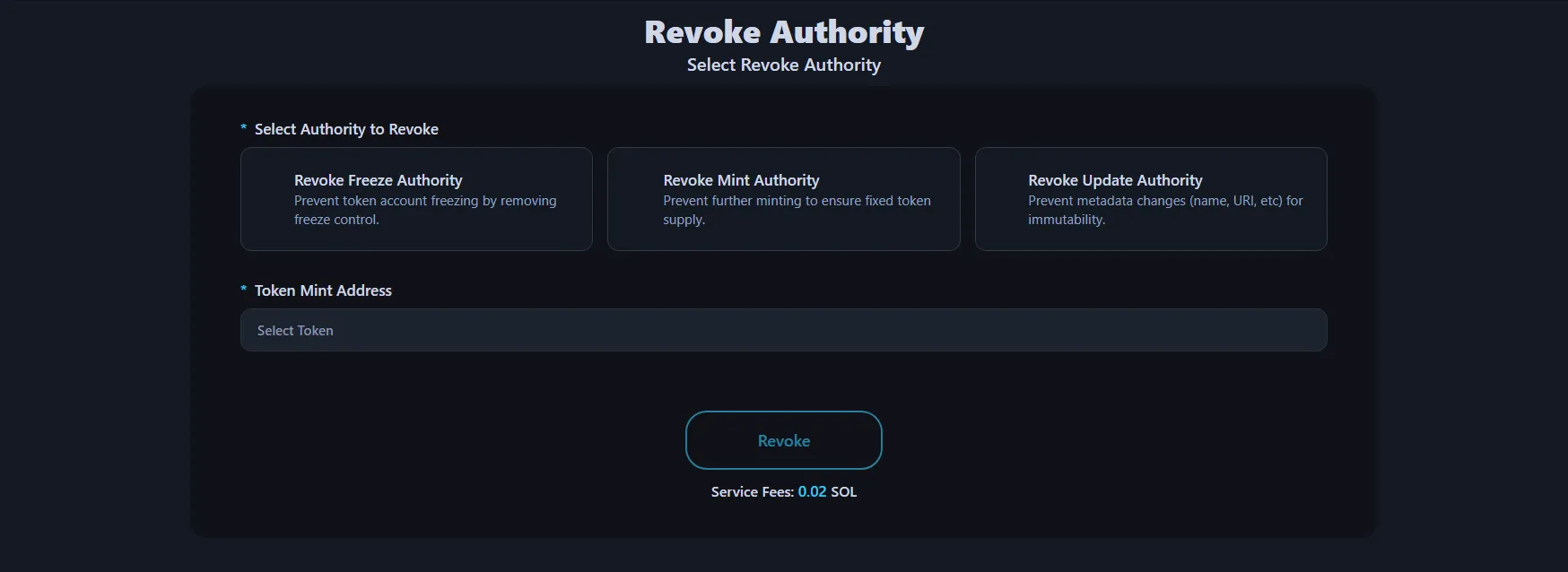
Navigate to Revoke Authority and follow these steps:
-
Connect Wallet : Click the Connect Wallet button in the top-right corner. You must connect the wallet that currently holds the authority for the token — typically the wallet that created the token.
-
Select Authority Type : Choose which authority you want to revoke: Freeze Authority, Mint Authority, or Update Authority.
-
Select Token : Select the token you want to revoke authority for. The interface shows your tokens with a clear status indicator:
Indicator Meaning ✅ Green checkmark You have this authority for that token ❌ Red X You don't have this authority for that token If a token shows a red X for a given authority, that authority has either already been revoked or was never assigned to your wallet.
-
Review Warning : A confirmation prompt appears. Revoking authority is permanent and cannot be undone. There is no recovery mechanism, no admin override, no way to reverse it. Make sure this is the right decision before proceeding.
-
Revoke Authority : Click "Revoke Authority" and approve the transaction in your wallet app.3
For a detailed walkthrough, see our Revoke Solana Token Authority Tutorial.
Cost: Free if you revoke during token creation. For tokens that already exist, 0.02 SOL per revoke transaction plus standard Solana network gas.
Which Authorities Should You Revoke?
That depends on your project, but here's the general guidance most of the Solana ecosystem follows:
Memecoins and community tokens → Revoke all three. Fixed supply, no freeze risk, locked identity. This is the expected standard.
Utility tokens with governance → Revoke freeze and update authority. Mint authority may need to stay active if your tokenomics include future emissions or staking rewards.
Compliance-sensitive tokens → Freeze authority may be required for regulatory reasons. Consult legal counsel before revoking.
Tokens with evolving branding → You may want to keep update authority active during early stages to refine metadata, then revoke once branding is finalized.
The key principle: revoke everything you don't actively need. Every active authority is a vector for both real risk and perceived risk.
How to Check if Authorities Are Already Revoked
You can check any token's authority status without connecting a wallet:
Solscan — Search the token mint address, check the "Authorities" section. Revoked authorities show as empty or null.
Birdeye / DEXScreener — Token detail pages typically flag active mint or freeze authority as warnings.
Alphecca's Revoke Tool — Connect the authority wallet and the interface shows green checkmarks (active) or red X marks (revoked/not held) for each authority type.
If you didn't create the token, you won't have authority over it — and that's expected. Authority belongs to the wallet that created the token (or that authority was transferred to).
FAQ
What does "mint revoked" mean?
It means the mint authority for that token has been permanently removed. No one can ever create additional tokens beyond the current supply. The supply is fixed forever.
Can I revoke authority if I'm not the token creator?
Only if the authority was transferred to your wallet. By default, authority belongs to the wallet that created the token.
Can I revoke multiple authorities at once?
Each authority type requires a separate transaction. You can revoke all three in sequence — it takes about 30 seconds total.
What happens after I revoke mint authority?
You permanently lose the ability to mint new tokens. The current supply becomes the maximum supply forever. This cannot be reversed.
What happens after I revoke freeze authority?
You permanently lose the ability to freeze any wallet's token balance. All holders can freely transfer their tokens at all times.
What happens after I revoke metadata update authority?
The token's name, symbol, image, and description become permanently locked. No one can modify the token's on-chain metadata.
Is revoking authority really permanent?
Yes. There is no undo, no recovery, and no admin override. This is enforced at the protocol level by Solana's Token Program. Once an authority is set to null, it cannot be reassigned.
How much does it cost?
Revoking authorities during token creation is free — you can disable mint, freeze, and update authority at no extra cost when you first create your token. For tokens that already exist, it's 0.02 SOL per authority revocation plus minimal Solana network gas fees. Revoking all three authorities on an existing token costs 0.06 SOL total.
Do I need to revoke authorities for tokens created on Pump.fun?
Pump.fun automatically revokes mint authority on token creation. However, you should check whether freeze and update authority are also revoked for your specific token.