
Best Pump Fun Volume Bot (2026): Lowest Cost Strategy to Trend on DEXScreener
Launched a memecoin on Pump Fun? The most important thing is getting on the trending page. Pump Fun's trending section is where countless investors discover new tokens. To get on trending, you need trading volume and active trading activity. By strategically using a volume bot alongside organic marketing, you can maximize your token's exposure and attract more investor attention.
This guide explains how to use the Alphecca Tools volume bot and what sets it apart from other platforms. We'll walk you through step by step so even first-time users can follow along.
What is a Pump Fun Volume Bot?
A Pump Fun volume bot is an automated trading tool that increases your token's maker count and trading volume to boost visibility on Pump Fun's trending page. Instead of manually trading from a single wallet, the bot creates multiple independent maker wallets to execute distributed buy/sell trades and generate natural trading patterns.
Learn more about how to avoid Pump.fun volume bot scams in our comprehensive guide.
How Does Pump Fun Trending Work?
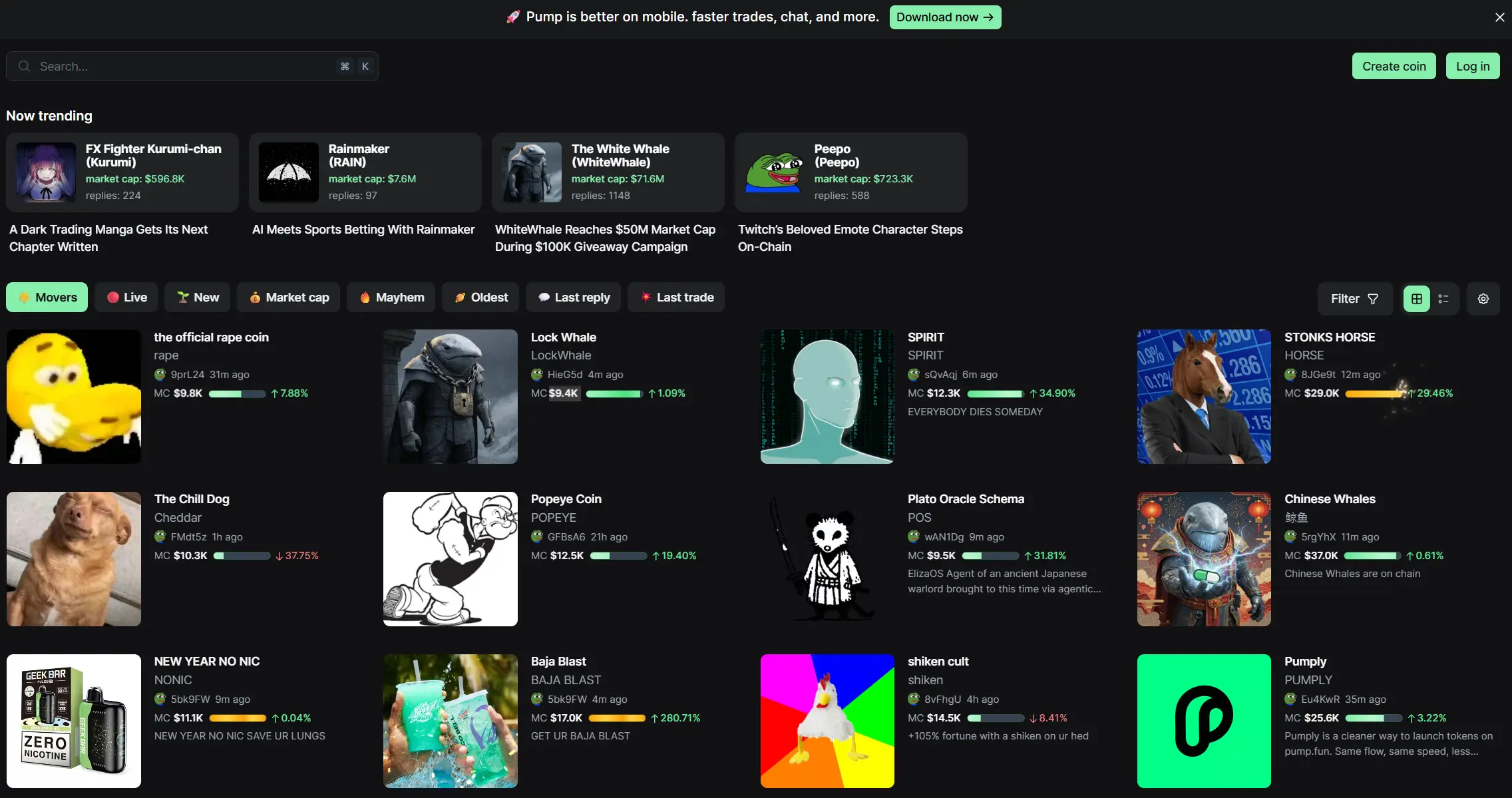 Hundreds of memecoins hit trending on Pump Fun every day.
Pump Fun trending rankings are determined by a combination of trading volume, unique maker wallet count, and trading consistency. Tokens with active trading from diverse wallet addresses are more likely to appear in the trending section and attract organic investor interest. Understanding this algorithm is key to maximizing your token's visibility.
Why Alphecca?
When choosing a volume bot, do you only compare service fees? The real costs are hidden elsewhere. Service fees are just the tip of the iceberg. When you factor in transaction gas fees, unrecovered account rent, and unreturned funds, your actual spending can be much higher.
The Gas Fee Difference
Solana network's minimum transaction gas fee is 0.000005 SOL. Alphecca works perfectly fine with this minimum gas fee. We don't charge unnecessarily high gas fees.
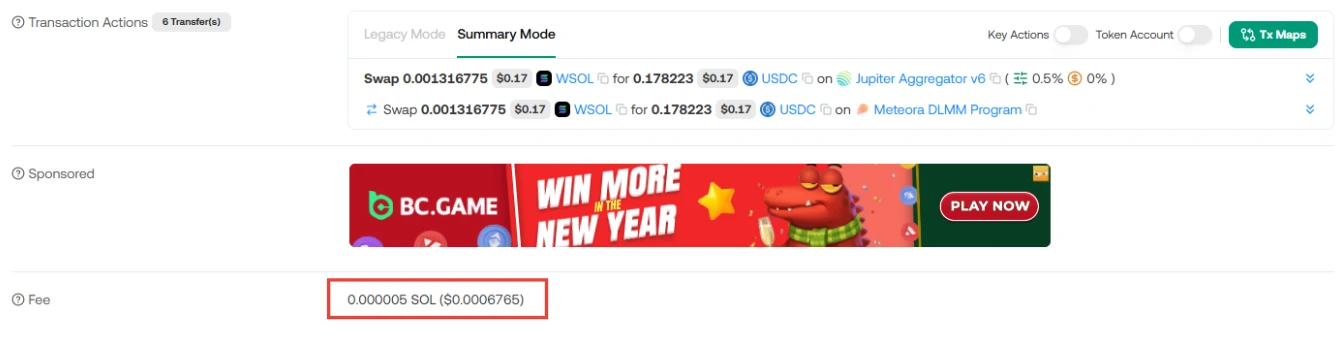 You can verify that the gas fee used for swaps is 0.000005 SOL.
If you're using another platform, make sure to check exactly how much gas fee they charge per transaction. Is it 0.0001 SOL? 0.001 SOL? These numbers might seem small, but volume bots generate hundreds or thousands of transactions. Small differences add up to significant losses.
For example, let's say 1,000 transactions are generated. With Alphecca's minimum gas fee (0.000005 SOL), that's 0.005 SOL. But on a platform charging 0.001 SOL per transaction, that's 1 SOL. A 200x difference.
You can verify all swap on-chain data directly in Alphecca's transaction log tab. Gas fees, swap details, and hashes are all transparently displayed. Don't waste your precious SOL.
Automatic Pump Fun PDA Recovery
When a new wallet trades a token on Pump Fun for the first time, an account rent (PDA) of 0.0018444 SOL is automatically charged. This is a structural feature of Pump Fun and cannot be avoided.
The problem is that volume bots create dozens or hundreds of new maker wallets. Each maker wallet incurs 0.0018444 SOL in PDA.
If you create 100 makers on other platforms, 0.18444 SOL goes to PDA. For 500 makers, that's 0.92 SOL. For 1,000 makers, 1.84 SOL. Most platforms don't recover this PDA. When the bot cycle ends, that cost just disappears. Nobody mentions it, but this is a significant hidden cost.
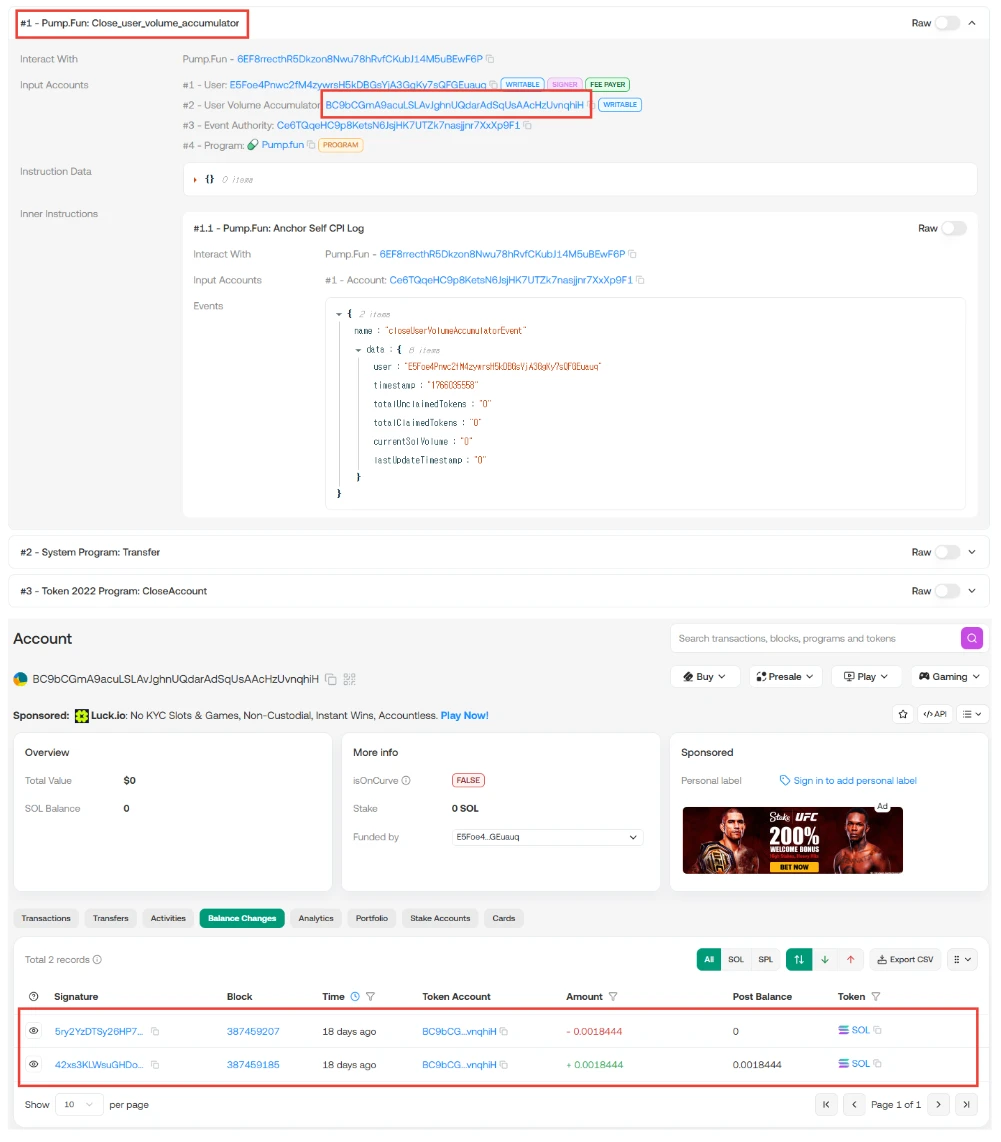 You can verify that the Pump Fun PDA rent of 0.0018444 SOL has been recovered.
Alphecca is different. After each maker cycle completes, all Pump Fun PDAs are automatically recovered and reused for the next maker creation. When the bot cycle ends, all remaining assets are returned to your wallet. This is fully automatic with no additional setup or work required. You can verify recovered PDAs in the transaction log.
Full Bot Log Visibility
You can monitor every step of the bot execution in real-time. Click the transaction log tab to see all processes in the bot cycle.
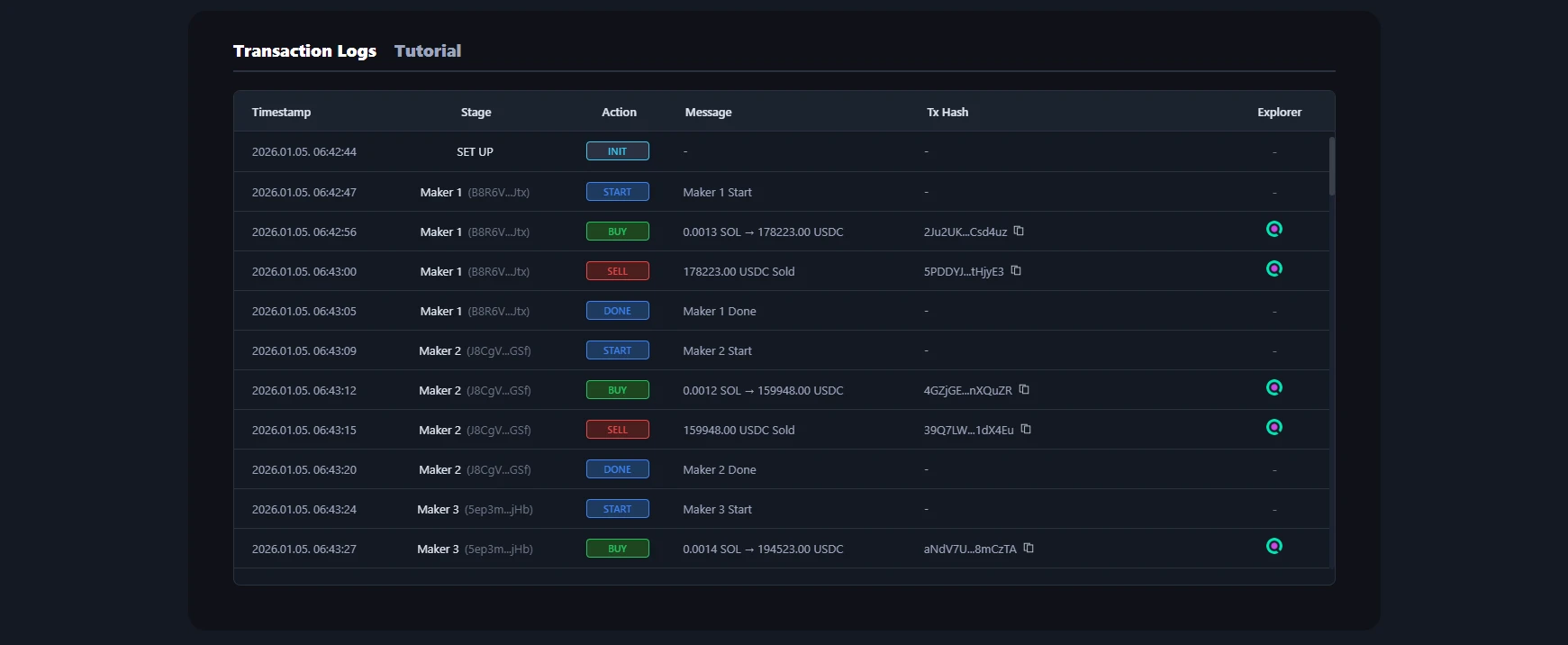 All bot transactions can be monitored in real-time.
Maker wallet creation, buys, sells, and ATA/PDA rent recovery are all recorded at each step. Click any hash to verify directly on Solscan.
If a platform doesn't provide bot logs or allow on-chain verification, you can't know how many transactions actually occurred or how much gas was used. No transparency means no trust.
Alphecca discloses all transactions without hiding anything. You can verify each maker's buy/sell timing, gas fees used, and recovered rent. If you're skeptical, verify it on-chain yourself. We have nothing to hide.
Checklist Before Using Other Platforms
If you're considering another platform, make sure to verify these points before paying. Avoid platforms that can't provide clear answers to these questions.
- Exactly how much is the gas fee per transaction?
- What's the total gas fee and Pump Fun swap cost used in the bot cycle?
- Do they recover and return Pump Fun PDA?
- Do they return all remaining SOL and tokens after the bot cycle completes?
- Can you check bot logs in real-time and verify all transactions on-chain?
Alphecca can answer "yes" to all five questions. Transparency is our core value.
How to Use Alphecca Volume Bot
Here's a step-by-step guide to using the volume bot on Alphecca Tools. Even first-time users can easily follow along.
Click the Pump.Fun Tool menu and go to the Volume Bot page.
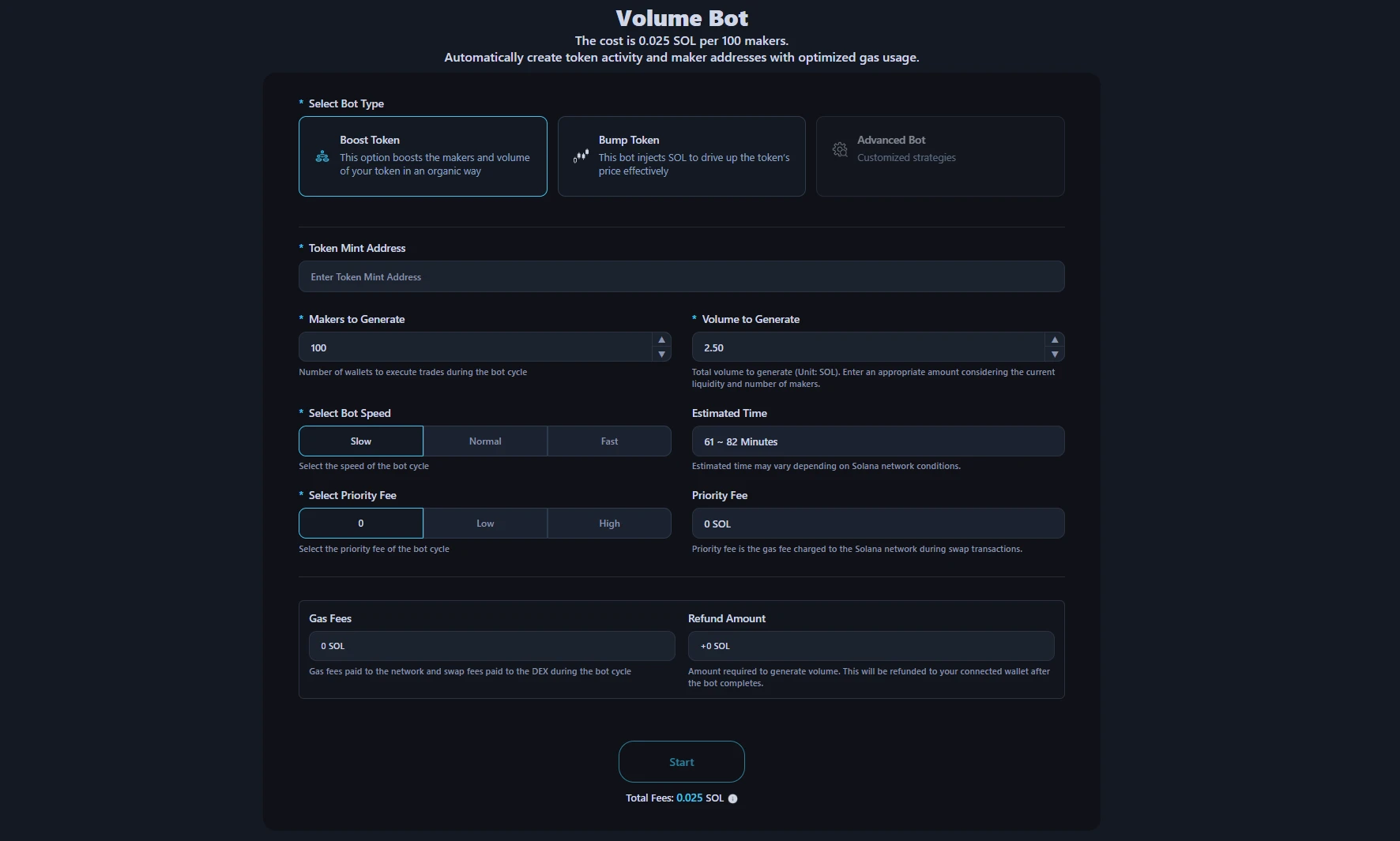
- Connect Wallet: Click the Connect Wallet button in the top right corner to connect your wallet.
- Select Bot Type: Booster bot naturally increases maker count and volume. Bumper bot injects liquidity to push up token price.
- Enter Token Address: Enter the mint address of the token you want to generate volume for. When available pools are displayed, select the pool to operate on.
- Set Parameters: Set the number of makers and the volume to generate (or liquidity to inject). More makers create more natural trading patterns.
- Run Bot: Check the estimated cost in the bot preview, then click the Start button and approve the transaction in your wallet.
- Completion & Fund Recovery: When the maker cycle completes, remaining SOL, tokens, and PDA are automatically returned to your wallet.
- Detailed guide available on the tutorial page.

YouTube video tutorial. You can enable subtitles → "English" in settings.
Costs & Fees
Service Cost
0.025 SOL per 100 makers, regardless of how much volume you want to generate.
Automatic Cost Calculation
Alphecca automatically calculates all costs needed for the bot cycle when you input parameters. Network gas costs, swap fees paid to the DEX, and SOL needed for volume generation are all visible on the page. You'll know exactly how much is needed before paying, and there are no hidden costs.
Automatic Refund
SOL used for volume generation is automatically returned to your connected wallet after the bot cycle completes. All amounts except the service fee are returned.
Important Notes
A volume bot is a tool that complements organic marketing strategies. It's most effective when used alongside social media activity, community building, and content marketing. A volume bot alone cannot achieve sustainable success. It must be backed by a project that provides real value and a genuine community.
Using automated tools to mislead users or violate platform rules may be restricted or prohibited depending on jurisdiction and platform policies. Alphecca is not responsible for any losses, legal issues, or other consequences arising from the use of this tool. Users are responsible for complying with their local laws and regulations, and all consequences of tool usage are attributed to the user.
Frequently Asked Questions
How does the Alphecca volume bot work?
Alphecca automatically calculates DEX swap fees, network gas fees, and volume generation costs when you input parameters. After payment, the amount excluding service fees moves to a newly created main wallet. The main wallet creates the set number of maker wallets and distributes funds to each. Each maker wallet completes token buy, sell, and ATA recovery (plus PDA recovery for Pump Fun), then returns funds to the main wallet. This cycle repeats until all makers complete their tasks, and the final remaining amount is automatically refunded to your connected wallet.
What's the difference between a volume bot and regular trading?
Regular trading happens from a single wallet, so the same wallet address appears repeatedly in trading records. In contrast, a volume bot creates distributed trades through multiple independent maker wallets. This creates more natural, organic trading patterns and makes it appear as if real trades are happening from various wallet addresses. This is why maker counts increase on DEXTools or DEXScreener.
How much does the Alphecca volume bot cost?
0.025 SOL per 100 makers, regardless of how much volume you want to generate. All costs including gas and swap fees are automatically calculated before payment.
What happens to my SOL after the bot cycle?
SOL used for volume generation is automatically returned to your connected wallet after the bot cycle completes. All remaining amounts except service fees are returned.
Can I check bot progress in real-time?
Yes. You can check the bot's progress in real-time in the transaction log tab. Every step is recorded, from maker wallet creation to buy transactions, sell transactions, and ATA recovery (PDA recovery). Click on each transaction hash to verify directly on blockchain explorers like Solscan.
Does the bot keep running if I leave the page?
Yes. After bot execution starts, the bot continues running on the server even if you leave the page or completely close the browser. When the bot completes, remaining SOL and tokens automatically return to the wallet you paid from. When you revisit the page later, you can check completed work history in the transaction log.
Is using a Pump Fun volume bot legal?
Legality depends on your local regulations and platform terms of service. Users must comply with Pump Fun rules and applicable laws in their jurisdiction. Alphecca provides tools for enhancing legitimate trading activity, but responsibility for how the tool is used lies with the user.
Get Started
Try the Pump Fun volume bot now.