
How to Use a Market Making Bot on Solana — Build Natural Charts Without Manual Trading
Most Solana tokens die the same way: a launch spike, a cliff drop, and then a flat line on DexScreener that no trader will ever click on. The chart tells the story before anyone reads the description.
A market making bot changes that. Instead of manually executing hundreds of trades to simulate healthy activity, the bot handles buying, selling, or both — on a schedule you define, with randomized amounts and intervals that produce charts indistinguishable from organic trading.
Three Modes, Three Strategies
The Solana Market Making Bot on Alphecca offers three modes, each designed for a different market condition.
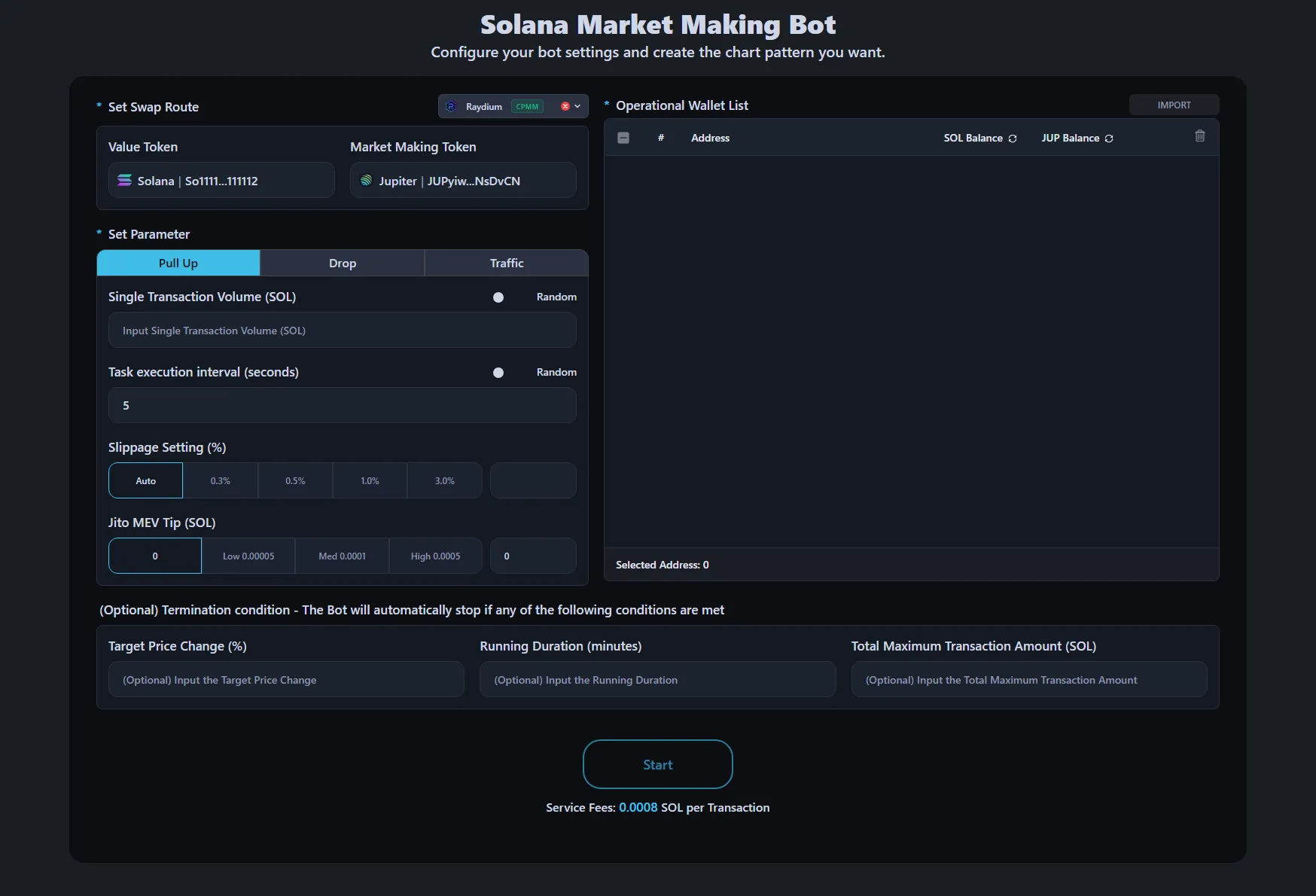
Pull Up — Push the Price Higher
The bot buys tokens on a schedule to gradually increase the price. This isn't a single large buy that creates a suspicious green candle — it's a series of smaller buys spread over time, creating a steady upward trend that looks natural.
When to use it: After launch when you want to build momentum. Before a marketing push when you want the chart to look healthy. When the price has dipped and you want to create a recovery pattern.
Drop — Controlled Sell Pressure
The bot sells tokens to bring the price down. This sounds counterintuitive, but controlled selling is essential for creating realistic charts. Real tokens don't go straight up — they have pullbacks, consolidations, and healthy corrections.
When to use it: After a significant pump to create a natural pullback. When you need to take profits without creating a single massive red candle. To simulate healthy market dynamics before the next leg up.
Traffic — Random Activity That Looks Real
This is the most powerful mode for long-term chart health. The bot randomly buys or sells with 50/50 probability. If it doesn't hold enough tokens to sell, it buys first. The result is sideways price action with natural-looking volume — exactly what traders see on established tokens.
When to use it: During quiet periods when you want the chart to stay active. For generating consistent daily volume without directional bias. To maintain holder confidence by showing ongoing market participation.
For detailed parameter descriptions and technical setup, see our Solana Market Making Bot Documentation.
What Makes Charts Look "Natural"?
Experienced traders and bot detection tools look for patterns. Here's what makes bot activity obvious — and how to avoid it:
Fixed intervals are a red flag. If a buy happens every exactly 10 seconds, it's clearly automated. Use random intervals with a wide range — for example, minimum 5 seconds and maximum 30 seconds. The wider the range, the more natural the pattern.
Identical trade sizes stand out. If every transaction is exactly 0.5 SOL, that's a pattern. Use random amounts between a minimum and maximum. A range like 0.3 to 0.8 SOL creates realistic variation.
Single-wallet activity is suspicious. Run the bot across multiple wallets simultaneously. Each wallet with different parameters, different intervals, different amounts. Open multiple browser windows with different configurations — this creates the appearance of independent traders with different strategies.
One-directional charts are fake. No real token goes straight up without pullbacks. Combine Pull Up runs with short Traffic runs. Alternate between modes. Real markets have buyers and sellers — your chart should reflect that.
Setting Termination Conditions
One of the most important features is knowing when to stop. The bot supports three automatic stop conditions:
Target price change. Set a percentage target — if you enter 30 in Pull Up mode, the bot stops once the price has risen 30% from where it started. This prevents overbuying and lets you switch to Traffic mode to consolidate.
Running duration. Set a time limit in minutes. Useful when you want to run the bot during specific hours — for example, during peak trading hours in your target market's timezone.
Maximum transaction amount. Set a SOL limit for buys or a token limit for sells. This is your budget cap — the bot stops before you spend more than planned.
These conditions are optional and work as "any of" — the bot stops when the first condition is met.
Practical Setup: Running Multiple Bots in Parallel
The key to creating truly organic-looking charts is running multiple bot instances simultaneously, each with different modes, wallets, and parameters. This simulates multiple independent traders operating with different strategies — which is exactly what a healthy market looks like.
Open multiple browser windows. Each window runs a separate bot instance with its own set of wallets. For example, one window runs Pull Up with wallets A, B, and C. Another window runs Traffic with wallets D, E, and F. A third runs Pull Up with different amount ranges and intervals using wallets G and H.
Use different intervals for each instance. One bot buying every 5–15 seconds, another every 20–60 seconds, another every 45–120 seconds. The overlapping but non-identical rhythms create a pattern that no single bot could produce — and that's exactly what real market activity looks like.
Mix modes across instances. Running Pull Up and Traffic simultaneously is the most effective combination. The Pull Up instance creates upward pressure while the Traffic instance adds random noise around it. The chart shows a gradual uptrend with natural volatility — not a smooth, suspicious diagonal line.
Vary the trade sizes across instances. One bot trading 0.1–0.3 SOL, another 0.3–0.8 SOL, another 0.05–0.15 SOL. Different "traders" have different capital sizes. This variation is what makes the activity convincing.
The result: a chart that looks like multiple real participants are actively trading your token, each with their own strategy and timing.
Market Making Bot vs Volume Bot — What's the Difference?
If you've used a volume bot, you know it does one thing well: generate transaction count. It's fast, simple, and effective for boosting your token's visibility on DEX aggregators.
A market making bot is different. It's not about raw volume — it's about shaping the chart. You control the direction (up, down, or sideways), the pace, the size of each trade, and when the bot stops. The result is a price chart that looks like real traders are actively participating.
Think of it this way: a volume bot fills the activity feed. A market making bot paints the chart.
We recommend using both together. Run the volume bot to generate the transaction count that gets your token noticed on DexScreener and Birdeye, while running the market making bot simultaneously to shape the price action into a chart that traders actually want to buy into. Volume attracts eyeballs — a well-shaped chart converts them into buyers.
Both tools support all major Solana DEXs — Pump.fun, Raydium, Meteora, and more. Whatever platform your token is listed on, the bots work out of the box.
Cost Comparison
Alphecca charges a flat 0.0008 SOL per transaction regardless of trade size. Compare this to typical DEX fees:
A 1 SOL swap on a standard platform costs roughly 0.01 SOL in fees (1%). On Alphecca, the same swap costs 0.0008 SOL — over 12x cheaper. As trade volume increases, the savings compound significantly. Running hundreds of transactions per day at standard DEX rates would be prohibitively expensive.
FAQ
How many wallets should I use?
The more wallets, the more natural the activity looks. A minimum of 3–5 wallets with different parameters is recommended. For maximum realism, use 10+ wallets each running in separate browser windows with different configurations.
Can I run Pull Up and Traffic at the same time?
Yes. Open multiple browser windows — one running Pull Up with one set of wallets, another running Traffic with different wallets. This creates the most realistic chart pattern.
What's the recommended slippage setting?
AUTO is recommended for highest success rate. If you're trading a low-liquidity token, you may need higher slippage. For established tokens with decent liquidity, 1–3% is usually sufficient.
Should I use Jito MEV tips?
If you're running during high-activity periods and front-running is a concern, set a tip (0.001–0.005 SOL). During quiet periods or if transaction success rate is already high, setting it to ZERO saves costs.
Will the bot drain my wallet?
Only if you don't set termination conditions. Always set at least one stop condition — either a time limit or a maximum transaction amount. This prevents the bot from running indefinitely and spending more than intended.