
How to Create a Liquidity Pool for Your Monad Token (2026)
Want to create a liquidity pool for your Monad blockchain token on a decentralized exchange (DEX)? This guide will help you get started. Creating a liquidity pool means enabling trading for your token, and once the liquidity pool is created, anyone in the world can buy and sell your token.
The major decentralized exchanges (DEXs) on Monad include PancakeSwap and Uniswap, and you can create a liquidity pool in just 5 steps.
Creating a Monad Token Liquidity Pool: Step-by-Step Guide
To create a liquidity pool for your Monad token, head over to the Monad Liquidity Pool Creator, make sure Monad is selected, and connect your preferred wallet.
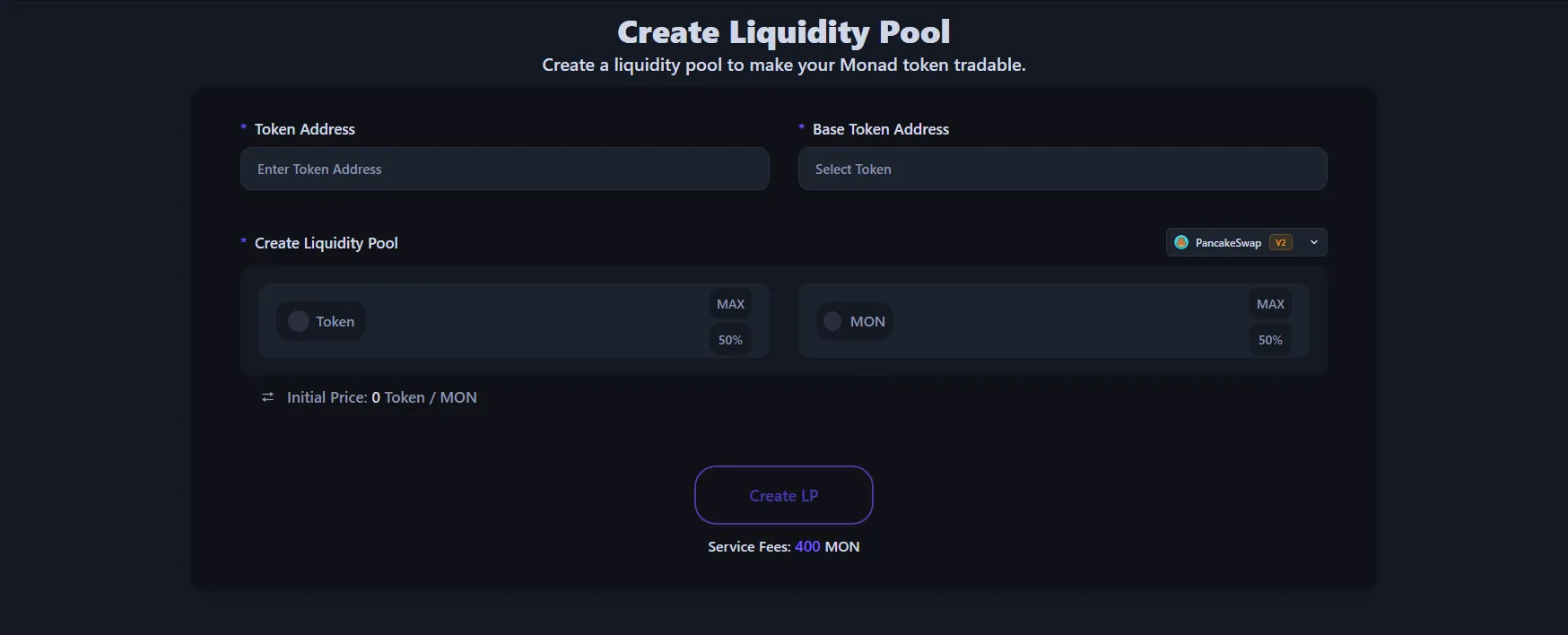
- Connect your wallet to the Monad Liquidity Pool dApp
- Enter or select the token address for your liquidity pool — this is your token ready to hit the market.
- Choose a pairing token like MON, USDT, or USDC — this determines your token's value.
- Select a DEX (PancakeSwap or Uniswap) and choose between V2 or V3 pool type.
- Enter the amount of your token and the pairing token to add as liquidity. This sets the initial price of your token.
- Click "Create LP" and approve the transaction.
For a detailed walkthrough on creating Monad token liquidity pools, check out our EVM Chain Liquidity Pool Tutorial.
Within moments, your liquidity pool will be live. You can view your trading activity and charts on DexScreener or DexTools. Creating a liquidity pool on Monad with Alphecca costs 400 MON plus a small gas fee, with no hidden charges.
Frequently Asked Questions
Here are some common questions when creating a liquidity pool on Monad:
Why do I need to create a liquidity pool?
Without a liquidity pool, your token cannot be traded. Creating one enables anyone to buy and sell your token on a DEX. Additionally, once your pool is live, your token gets displayed on platforms like DexScreener and DexTools, exposing your project to potential investors.
How much does it cost to create a liquidity pool on Monad?
With Alphecca, the service fee is 400 MON, and gas fees are minimal. There are no additional costs. However, you'll need to provide your own tokens and pairing tokens (MON, USDT, etc.) for the pool. Monad is a high-performance EVM-compatible blockchain with low gas fees.
What's the difference between V2 and V3 liquidity pools?
V2 pools distribute liquidity evenly across all price ranges, making them straightforward to set up and manage. V3 pools allow you to concentrate liquidity within a specific price range for greater capital efficiency, but your liquidity becomes inactive if the price moves outside that range. V2 is ideal for beginners, while V3 suits those who can actively manage their positions.
Can I create multiple liquidity pools for one token?
Yes, you can create multiple liquidity pools for a single token. Beyond MON pairs, you can also create USDT or USDC pairs. You can even create the same pair across multiple DEXs like PancakeSwap and Uniswap. Just make sure to set consistent token prices across all pools by matching the liquidity ratios.
Can I trade my token immediately after creating a liquidity pool?
Yes, your token becomes tradable instantly once the liquidity pool is created. As soon as the transaction is confirmed on the blockchain, anyone worldwide can buy and sell your token. You can track real-time charts and trading activity on DexScreener, DexTools, and GeckoTerminal.
How much liquidity should I add?
There's no minimum requirement, but adding too little liquidity results in high slippage, making trades difficult. We recommend starting with at least $500–$1,000 in liquidity. Higher liquidity means better price stability and smoother large trades, which builds investor confidence.
Don't have a Monad token yet? Check out our guide on creating a token on Monad.
Wrapping Up
You now have everything you need to create a liquidity pool on Monad. With Alphecca, you can launch your pool in minutes without any coding knowledge. Ready to take your token to market? Get started today.